At its core, a server for streaming video is a specialized piece of software (and often hardware) built for one purpose: sending video over a network efficiently. It’s not like a standard web server that just shoves a whole file at you and calls it a day. A streaming server is far more sophisticated.
Instead of forcing you to download an entire video file before you can press play, a streaming server sends it in tiny, sequential pieces. This allows playback to start almost instantly, creating the seamless experience we’ve all come to expect.
The Digital Warehouse Manager Analogy
Think of a regular web server as a librarian. You ask for a book (a file), and they hand you the entire volume. That works perfectly for a text document or a small image, but imagine if the “book” was a massive, multi-gigabyte 4K movie file. You’d be stuck waiting forever.
A server for streaming video is more like the master warehouse manager for a global movie distributor. Their job isn’t just to fetch a film canister. It’s to manage a complex, high-speed operation that ensures millions of viewers get a flawless picture, no matter what device they’re using or how good their internet connection is.
This specialized server is constantly juggling three critical tasks at once, making sure everything runs smoothly behind the scenes.
The Three Core Responsibilities
The real magic of a dedicated server for streaming video is how it handles the entire delivery pipeline, a process far more involved than simply hosting a file.
- Intelligent Storage: First, it acts as a massive digital vault. It has to store enormous high-resolution video files safely while allowing countless users to access them simultaneously, which demands storage optimized for incredibly fast read-and-write speeds.
- On-the-Fly Transcoding: This is arguably its most important job. The server takes the master video file and, in real-time, creates multiple versions of it in different formats and quality levels. It’s like having a version ready for a giant 4K smart TV, a laptop, and a smartphone on a shaky 4G connection—all created from a single source.
- Seamless Delivery: Finally, it uses specialized streaming protocols (like HLS or DASH) to send the video out in small, digestible chunks. The server constantly monitors the viewer’s connection. If it slows down, it instantly switches to sending lower-quality chunks to prevent that dreaded buffering wheel. This process is called Adaptive Bitrate Streaming (ABR).
To get a clearer picture, let’s break down how these functions differ from a standard web server.
Key Functions of a Video Streaming Server
This table offers a quick summary of the essential tasks a server for streaming video performs compared to a standard web server.
| Function | Video Streaming Server | Standard Web Server |
|---|---|---|
| File Delivery | Sends data in small, sequential chunks. | Delivers the entire file at once. |
| Playback | Starts almost instantly; no full download needed. | Requires the full file to be downloaded first. |
| Content Processing | Transcodes files into multiple formats/bitrates. | Serves files as-is without modification. |
| Adaptability | Adjusts video quality in real-time (ABR). | Quality is fixed; no adaptation to network changes. |
| Protocols | Uses specialized protocols like HLS, DASH, RTMP. | Primarily uses HTTP/S for file transfer. |
These specialized capabilities are precisely why platforms like Netflix, YouTube, and Twitch can deliver high-quality, buffer-free video to millions of people all at once.
This entire ecosystem is the engine that powers modern media. The global video streaming market was valued at a staggering USD 674.25 billion in 2024 and is projected to skyrocket to USD 2,660.88 billion by 2032, according to data from Fortune Business Insights. That explosive growth is built on the back of this powerful server technology.
Choosing Your Streaming Architecture
Picking the right foundation for your video service is a lot like deciding where to set up a new business. You could buy the land and build your headquarters from the ground up (self-hosted), lease a flexible warehouse you can customize (cloud servers), or simply rent a ready-to-use office in a managed building (managed platforms). Each path comes with its own set of trade-offs in control, cost, scalability, and the expertise you’ll need on hand.
Ultimately, the best server for streaming video depends entirely on your project’s goals, budget, and technical team. There’s no magic bullet—only the best fit for you. This simple decision tree can help you start thinking through the first critical choice.
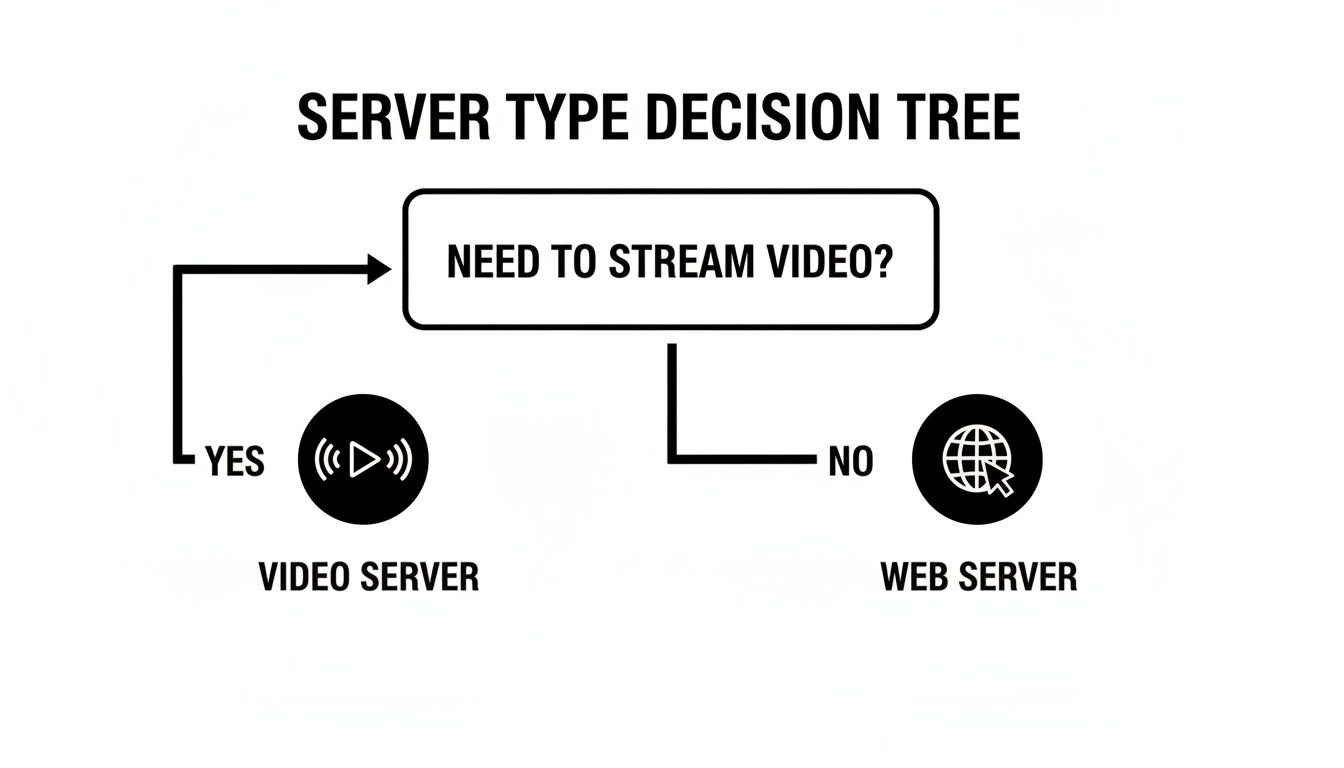
As the graphic shows, the moment video enters the picture, you’re on a different path. A standard web server just won’t cut it; you need a specialized architecture to deliver a smooth, high-quality experience to your viewers.
The On-Premise or Self-Hosted Model
Going the self-hosted route means building your own streaming infrastructure from scratch, which gives you the ultimate level of control. You physically own the servers, you fine-tune the software to your exact needs, and you manage every single step of the video pipeline. This hands-on approach is often favored by large media companies with ironclad security requirements or unique, highly customized workflows.
Of course, that level of control doesn’t come cheap. You’re on the hook for everything:
- Hefty Upfront Capital: You’ll need to buy server hardware, networking gear, and storage arrays, which requires a major initial investment. Even a basic self-built NAS server for home use can top $1,200, and enterprise-grade equipment costs exponentially more.
- Constant Maintenance: You need a dedicated IT team to handle hardware failures, roll out software patches, monitor performance, and manage the physical security of your data center.
- Rigid Scalability: If a live event goes viral, you can’t just magically add more capacity. Scaling means physically buying and installing new hardware, a process that can drag on for weeks or even months.
This model is really only practical for organizations that have predictable traffic, a deep bench of technical experts, and the budget for significant capital spending.
While the complete control of an on-premise setup is tempting, the operational burden and slow scaling make it a tough choice for any service expecting dynamic growth or sudden spikes in viewership.
The Cloud Server or IaaS Approach
Using Infrastructure-as-a-Service (IaaS) from providers like AWS, Google Cloud, or Azure is like leasing that flexible warehouse. You don’t own the physical building, but you’re free to build out the inside however you see fit. You rent virtual servers, storage, and networking resources, then install and manage your own streaming server software (like Wowza or Nimble Streamer) on top of that foundation.
This model hits a sweet spot between control and flexibility. You get full administrative access to your virtual servers without the headaches of managing physical hardware. The biggest win here is scalability. Need more horsepower for a major live broadcast? You can fire up hundreds of new server instances in minutes and then tear them all down when the event is over, paying only for the time you used them.
This agility is a huge reason the U.S. video streaming market is projected to hit $97.6 billion by 2025. In fact, cloud-based solutions power around 70% of deployments precisely because they offer this on-demand scalability. You can dig deeper into these market trends and the dominance of cloud infrastructure to see how the industry has shifted.
The Managed Platform or SaaS Model
Think of a Software-as-a-Service (SaaS) platform as that turnkey office. You don’t have to think about the building, the electricity, or the plumbing—you just show up and get to work. Services like LiveAPI take care of all the complex infrastructure for you, from managing servers and transcoding video to ensuring global delivery through a built-in CDN.
With this model, you typically interact with the service through an API. You send your video files or live streams, and in return, you get a simple player to embed on your site. This is by far the fastest way to get to market and requires the least amount of technical overhead.
The trade-off is that you give up some granular control and commit to a recurring subscription cost. For most businesses, though, the benefits are too good to pass up:
- Zero Infrastructure Management: No more patching servers or updating software. The platform handles it all.
- Automatic Scalability: These platforms are built from the ground up to handle massive audiences without you lifting a finger.
- Predictable Costs: You usually pay based on usage (like minutes streamed or data transferred), which ties your costs directly to your growth.
This approach frees you up to focus completely on your content and your application, making it the perfect choice for anyone who wants to launch a professional-grade server for streaming video without hiring a dedicated infrastructure team.
Comparing Video Hosting and Delivery Models
To help you visualize the trade-offs, here’s a quick breakdown of how these different architectures stack up against each other. Each model offers a distinct balance of control, cost, and complexity.
| Model | Best For | Control | Scalability | Cost Structure |
|---|---|---|---|---|
| Self-Hosted | Large media orgs with specific security/workflow needs and deep IT resources. | Total | Low & Slow: Requires physical hardware purchases. | High Upfront Capital: Major initial investment, plus ongoing operational costs. |
| Cloud (IaaS) | Teams with technical expertise who need flexibility and on-demand scaling. | High: Full control over software and virtual instances. | High & Fast: Scale up or down in minutes. | Pay-as-you-go: Billed for resources consumed (CPU, storage, bandwidth). |
| Managed (SaaS) | Businesses wanting the fastest time-to-market with minimal technical overhead. | Low: Limited to API-based configurations. | Automatic: Built-in and managed by the provider. | Subscription/Usage: Predictable recurring fees based on metrics like minutes streamed. |
Choosing the right model is the first and most critical step in building a successful streaming service. The decision you make here will shape your budget, your team’s focus, and your ability to grow your audience over time.
Understanding the Core Streaming Protocols
To really get what makes a streaming server tick, you have to understand the languages it speaks. These “languages” are called protocols, and they’re the rulebooks that let a server send video to a viewer’s device in a way that’s fast, reliable, and buffer-free.
Think of it like a global shipping operation. You wouldn’t just toss a priceless vase onto a truck and hope it arrives in one piece. You’d carefully break it down, pack it into small, numbered boxes, and send them off with clear instructions on how to put it all back together at the destination. Streaming protocols do precisely that, but for video data.
This whole process of breaking up a massive video file into tiny pieces is what modern streaming is built on. It creates a much more resilient delivery system that can handle the unpredictable nature of the internet—a must-have for keeping viewers from clicking away.
HLS and DASH: The Workhorses of Video Delivery
Two protocols pretty much run the show today: HLS (HTTP Live Streaming) and DASH (Dynamic Adaptive Streaming over HTTP). They have their technical differences, but they’re both built on the same brilliant idea. They use standard web servers (HTTP), which makes them a breeze to deploy and keeps them from getting blocked by corporate firewalls.
Here’s how they work: they chop the video into short segments, usually just a few seconds long. Along with these video chunks, the server also creates a “manifest” file, which is basically a table of contents. This little file tells the video player what order the chunks go in and, crucially, all the different quality levels that are available for streaming.
This segmentation is the secret sauce behind a technology called Adaptive Bitrate Streaming (ABR).
What is ABR? Adaptive Bitrate Streaming is the magic that stops buffering in its tracks. The video player on your phone or laptop is constantly checking your internet speed. If your connection is solid, it requests high-quality video chunks. If you walk into a room with spotty Wi-Fi, it instantly starts asking for lower-quality chunks, ensuring the video keeps playing without that dreaded spinning wheel.
This is exactly why a video on your phone might get a bit fuzzy for a second when you leave a Wi-Fi zone, then suddenly sharpen up. Your player, guided by the HLS or DASH manifest, is making smart decisions on the fly. You can dive deeper into this and learn more about how HTTP live streaming works to see its impact on modern video.
RTMP: The Old Guard of Ingestion
While HLS and DASH are the masters of getting video to the viewer, a different protocol handles getting the video from the broadcaster to the streaming server. This first step is called ingestion. For years, the undisputed king of ingestion has been RTMP (Real-Time Messaging Protocol).
Originally built for Flash Player (remember that?), RTMP is fantastic at sending a stable, low-latency stream from an encoder—like OBS on a gamer’s PC—to a media server. It’s known for maintaining a rock-solid connection, which makes it perfect for live events where you can’t afford to drop the stream.
But RTMP has a big problem: modern browsers don’t support it for playback. This leads to a very common workflow for nearly any live broadcast:
- Ingestion: The streamer sends their live feed to the server using RTMP.
- Transcoding: The streaming server immediately gets to work, processing the incoming RTMP stream.
- Delivery: It then repackages that video into HLS and/or DASH to send it out to viewers all over the world.
This setup plays to the strengths of each protocol—RTMP for its reliable upload and HLS/DASH for their flexible, adaptive delivery to any device.
WebRTC: For When Every Millisecond Counts
Finally, there’s a newer protocol on the scene built for one thing: speed. WebRTC (Web Real-Time Communication) is all about ultra-low latency. While HLS and DASH might have a delay of several seconds, WebRTC can bring that down to less than 500 milliseconds.
This makes it the only real choice for applications where instant interaction is non-negotiable.
- Video conferencing and virtual meetings
- Live auctions where you need to bid now
- Interactive gaming streams with audience participation
- Telehealth appointments with doctors
Unlike the others, WebRTC tries to establish a direct peer-to-peer connection between users, cutting out the middleman and shortening the data’s travel time. It’s more complex to scale for a broadcast to millions, but its near-instant delivery makes it the go-to for anything that needs a real-time, two-way conversation. Knowing which protocol to use for which job is the first step in designing a killer streaming setup.
Planning Your Server Deployment
Moving from a theoretical idea to a real, working setup takes some serious planning. Before you even think about buying hardware or signing up for a cloud service, you have to get a handle on your resource needs. Guessing at this stage is a recipe for disaster—you’ll either end up with a server that’s frustratingly underpowered or one that’s a massive, expensive overkill. This whole process is called capacity planning, and it’s basically the blueprint for your streaming operation.
At its core, capacity planning boils down to three things: bandwidth, storage, and processing power. Each one is directly tied to the kind of content you’re serving and the size of your audience. If you get the math wrong on just one of them, you can create a bottleneck that tanks the entire viewing experience.
Think about it this way: you might have a server with tons of storage for your video library, but if your bandwidth is too low, only a few people can watch at the same time before everyone gets stuck staring at that dreaded buffering wheel.
Estimating Your Core Resource Needs
To kick things off, you need to answer some honest questions about what you’re trying to achieve. The answers will directly shape the specs for your server. Be realistic about your project’s scale, not just for launch day but for the foreseeable future.
Here’s a practical checklist to get you started:
- How many people will be watching at once? This is your concurrent viewership. Are we talking about 100 people for a niche webinar or 10,000 for a major product launch?
- What quality will you be streaming in? The average bitrate is key. A solid 1080p stream usually sits around 5 Mbps, but a crisp 4K stream can easily eat up 25 Mbps or more.
- How many different quality levels will you offer? Remember Adaptive Bitrate Streaming (ABR)? Creating separate versions for 1080p, 720p, and 480p viewers chews through processing power and storage.
- How big is your video library? For video-on-demand, you need to calculate the total storage in gigabytes or terabytes. And don’t forget to account for all those ABR versions!
Once you have these numbers, you can do some simple math. To figure out your peak bandwidth, just multiply your expected concurrent viewers by your average stream bitrate. For example, if you anticipate 500 viewers all watching a 4 Mbps stream, you’ll need at least 2,000 Mbps (or 2 Gbps) of outbound bandwidth.
A classic rookie mistake is massively underestimating the power needed for transcoding. Taking a single 1080p live feed and converting it into multiple ABR renditions in real-time is an incredibly CPU-intensive job. A lot of servers fall over during live events simply because this processing load wasn’t accounted for.
Calculating Storage and Processing Power
Figuring out storage is a bit more straightforward, but no less important. Start with the size of your original, high-quality video files. Then, multiply that by the number of ABR renditions you plan to create. A single one-hour 1080p video might be 4 GB, but creating four lower-quality versions could easily push the total storage for that one video to 16 GB.
Processing power, especially the CPU, is the engine that makes all the transcoding happen. For live streaming, the demands are intense. A server has to grab the incoming feed and, at the same exact time, encode it into multiple formats and bitrates. This is why cloud providers often have “CPU-optimized” machines built specifically for these kinds of heavy-lifting tasks.
If you’re going the DIY route, this planning phase can feel a bit overwhelming, especially if it’s your first time. For those who enjoy a hands-on project, our guide on how to build a home server for media walks through all the hardware and software details.

The image above shows how a managed platform can simplify things, turning all those complex server metrics into clear, actionable insights. You can see at a glance how your system is performing—something that’s incredibly difficult to achieve with a self-hosted setup without a lot of custom work. By putting in the effort to plan your deployment carefully, you’re laying the groundwork for a stable, scalable streaming server that won’t let your audience down.
Securing and Scaling Your Video Content
Getting your streaming service off the ground is one thing. Keeping it secure and stable as your audience grows? That’s the real challenge. Once you go live, your video streaming server is immediately hit with two major pressures: fending off bad actors and handling the ever-increasing demands of traffic. If you drop the ball on either, you’re looking at lost revenue, a hit to your reputation, and a lot of unhappy viewers.
Think of security and scaling not as add-ons, but as core pillars of your entire operation. It’s a two-front battle. You have to lock down your content to stop piracy in its tracks, while also making sure your server doesn’t buckle under the pressure of a sudden traffic spike. This is the moment your setup graduates from a basic project to a professional, resilient streaming platform.

Locking Down Your Video Streams
Protecting your streams is absolutely critical, especially if you’re running a subscription service or selling premium content. A simple shared link can spread like wildfire, leading to rampant unauthorized access and killing your revenue. Thankfully, you can build several layers of security right into your server to keep your streams safe.
- Token Authentication: This is your first and most powerful line of defense. When a legitimate user hits play, your application generates a unique, short-lived token. Your server will only deliver the video if it receives a valid token, stopping unauthorized viewers who just copied and pasted the stream URL dead in their tracks.
- Encryption (AES-128): Just like HTTPS secures a website, you can encrypt your video segments. AES-128 encryption scrambles the video data itself. Only authorized players holding the correct decryption key can piece it back together, making the stream complete gibberish to anyone trying to intercept it.
- DRM (Digital Rights Management): For top-tier, Hollywood-grade content, DRM is the gold standard. Services like Google Widevine, Apple FairPlay, and Microsoft PlayReady offer a heavy-duty framework for managing licenses and preventing piracy. Just be aware, they also add significant complexity and cost to your setup.
Monitoring Performance and Preparing for Scale
You can’t fix what you can’t see. Proactive monitoring is the only way to maintain a healthy streaming infrastructure and catch problems before your viewers do. A reliable video streaming server needs a watchful eye on a few key metrics that act as its vital signs.
Keep a close watch on these critical performance indicators:
- CPU Load: High CPU usage is often the canary in the coal mine, especially during live transcoding. If your CPU is consistently pinned above 80%, your server is gasping for air and might start dropping frames.
- Bandwidth Utilization: Watching your network traffic helps you map out peak viewing times and confirm you have enough headroom. The moment you max out your bandwidth, every single viewer starts buffering.
- Error Rates: Keep an eye on how many viewers are getting failed segment requests or playback errors. A sudden jump in this number is a huge red flag pointing to a server or network issue.
- Latency: For live events, this is the time gap between something happening in real life and when viewers see it on screen. High latency can completely ruin the experience for sports, gaming, or any interactive broadcast.
Scaling isn’t just about handling more viewers; it’s about handling them gracefully. The goal is to build a system where a traffic spike from 100 to 10,000 concurrent users doesn’t cause a system-wide meltdown.
This is where a multi-server architecture, almost always backed by a Content Delivery Network (CDN), becomes non-negotiable. A CDN works by caching your video segments on servers strategically placed all over the world, bringing the content much closer to your viewers. This takes a massive load off your main server and dramatically improves playback quality.
To dig deeper, our guide on using a CDN for video streaming breaks down exactly how this strategy helps you scale without breaking a sweat. By combining tough security with diligent monitoring, you can build a truly reliable service that both protects your content and delights your audience.
Tying It All Together with a Modern Streaming API
All the theory about protocols, encoding, and scaling really comes to life when you see it in action. So, let’s move from planning to practice. Instead of getting bogged down in server configurations and command-line interfaces, you can use a modern streaming API to handle the heavy lifting. This lets you get back to what matters: building your application.
We’ll walk through a real-world example using a service like LiveAPI to see just how straightforward this can be. The whole idea is to show how a managed platform takes a complex infrastructure project and boils it down to a few simple API calls. You get all the power of a custom-built server for streaming video without having to build it yourself.
Getting Started The Easy Way
The first step is usually the easiest: sign up and grab an API key. This key is your secure credential—it’s how your app proves to the streaming service that it has permission to create and manage streams. Think of it as the master key to your own video processing and delivery powerhouse.
With that key in hand, the process of launching a live stream is surprisingly simple and can be fully automated with code.
- Create a Stream: You make a single API request telling the service you want to start a new live stream.
- Get Ingest Details: The service instantly replies with an RTMP URL and a unique stream key. This is the private address you’ll send your video feed to from software like OBS or a hardware encoder.
- Start Broadcasting: Just copy and paste those details into your broadcast software and hit “Start Streaming.”
- Embed the Player: The API also gives you a small snippet of HTML. You can drop this code right onto your website, and a fully functional player will appear.
This entire workflow completely bypasses the need for any manual server setup. In the background, the service automatically spins up resources, prepares for transcoding, and readies its global CDN to deliver your stream—all triggered by that one initial API call.
How The API Tames Complexity
Behind those simple steps, the managed platform is doing an incredible amount of work. As soon as your high-quality RTMP feed hits their servers, they immediately start transcoding it into multiple versions for adaptive bitrate streaming. This is what ensures every viewer, whether on a fast fiber connection or a spotty mobile network, gets a smooth experience. And you didn’t have to configure a thing.
At the same time, the video is packaged into modern formats like HLS and DASH. The embeddable player they provide is already built to handle ABR, intelligently switching between quality levels to prevent that dreaded buffering wheel from ever appearing.
What does this mean for your project?
- No Transcoding Hardware: Forget about calculating CPU loads or provisioning powerful servers just to handle video processing. The platform takes care of it.
- No Protocol Worries: The service automatically converts your RTMP stream for flawless delivery to any device, from web browsers to mobile apps.
- Instant Global Scale: The built-in CDN ensures your stream is delivered from a server close to every viewer, guaranteeing low latency and high quality anywhere in the world.
By using an API, you’re essentially plugging into a massive, pre-built infrastructure. It’s the difference between trying to build a car from scratch and just getting the keys to a high-performance vehicle. You can deploy a professional-grade, scalable, and secure server for streaming video in a matter of minutes, not months.
Frequently Asked Questions
What Is the Best Server for Streaming Video?
That’s the million-dollar question, but the honest answer is: it depends entirely on your project. There’s no single “best” server for everyone.
If you’re just starting out or working on a smaller-scale project, a managed platform like LiveAPI is probably your best bet. It takes care of all the tricky technical stuff behind the scenes so you can focus on your content. On the other hand, if you’re a developer who needs total flexibility and the ability to scale up or down at a moment’s notice, a cloud server from a provider like AWS gives you that raw power.
And for large organizations with very specific security needs or massive, predictable traffic? A self-hosted, on-premise server offers the ultimate control, but it comes with a hefty price tag and requires a dedicated team to manage it.
Can I Use a Regular Web Server for Streaming?
Technically, you can put a video file on a web server, but you shouldn’t call it “streaming.” A standard web server just pushes the entire file to the user for download. This means your viewers have to wait for a significant chunk of the file to arrive before they can even press play.
True streaming is much smarter. A dedicated server for streaming video uses protocols that allow for things like Adaptive Bitrate Streaming (ABR), which is crucial. ABR dynamically adjusts the video quality based on the viewer’s internet speed, preventing that dreaded buffering wheel. For anything more than a tiny clip, a proper streaming server is non-negotiable for a good user experience.
How Much Bandwidth Do I Need for a Streaming Server?
The amount of bandwidth you need boils down to two key factors: how many people are watching at the same time, and the quality of your video stream.
Here’s a simple way to get a baseline estimate: multiply your expected number of concurrent viewers by your stream’s bitrate.
For example, if you anticipate 100 people watching a 4 Mbps (megabits per second) stream simultaneously, you’ll need at least 400 Mbps of outbound bandwidth. Always plan for your peak audience, not your average—nothing kills a live event faster than a server that can’t keep up.
Is It Better to Build or Buy a Streaming Solution?
This is the classic build vs. buy dilemma. Building your own streaming infrastructure from scratch gives you complete control over every single component. The trade-off? It’s incredibly expensive, complex to set up, and requires constant maintenance and a team of specialists to keep it running.
For most businesses, buying into a managed solution or using a streaming API is a much more practical path. It dramatically speeds up your launch time, has lower upfront costs, and handles all the scaling for you. This frees up your team to do what they do best: creating great content and building your application, not wrestling with server configurations.
Ready to launch your streaming service without the headache of managing servers? LiveAPI provides a powerful, developer-friendly platform that handles all the heavy lifting of transcoding, delivery, and scaling. Explore our features and start building today.