At its core, an on demand video platform (VOD) is just a digital library that lets people watch what they want, when they want. Think of Netflix or YouTube—they’ve completely untethered us from the old-school, fixed schedules of broadcast TV, giving us total control.
How an On Demand Video Platform Really Works
It’s easy to think of a VOD platform as just a website with videos, but it’s much more. Imagine a massive, automated warehouse and a lightning-fast delivery service all rolled into one. When a creator uploads a video, they’re essentially dropping off a package at the warehouse door. Behind the scenes, a whole series of complex operations spring into action before anyone ever hits the play button.
This whole journey, from the initial upload to the final playback on a screen, is handled by the platform’s architecture. It’s a sophisticated system built to manage everything from getting a file ready for viewing to delivering it flawlessly to potentially millions of people at the same time.
The Video’s Journey from Upload to Your Screen
The “magic” that makes on-demand video work is actually a well-defined sequence of steps. Each stage is designed to solve a specific technical problem to make sure the viewing experience is seamless.
Here’s the basic workflow:
- Ingest: This is where it all begins. A creator uploads their original video file. The platform takes in this file, makes sure it’s not corrupted, and gets it ready for the next phase.
- Transcoding: A single video file won’t work for everyone. Someone watching on a 4K TV needs a much higher quality version than someone on a smartphone with a spotty data connection. Transcoding is the process of converting the original video into multiple different formats and resolutions to ensure smooth playback on any device.
- Storage: After transcoding, all these different versions of the video are stored securely in the cloud. This storage has to be reliable enough to prevent any data loss but also fast enough to pull files for immediate delivery.
- Delivery: When you click play, your device pings the platform. A Content Delivery Network (CDN), which is a vast network of servers spread across the globe, figures out where you are and how good your internet is. It then sends the best possible version of the video from a server close to you, which is what minimizes buffering and lag.
Why an API is a Game-Changer for VOD
For any developer, trying to build all of that infrastructure from the ground up would be a monumental task. It would mean sinking a fortune into hardware, software engineering, and ongoing maintenance. This is exactly why an API-first on demand video platform like LiveAPI is so crucial.
An API, or Application Programming Interface, is basically a toolkit for developers. It provides a set of commands that let them plug powerful VOD features directly into their own apps without having to build the complicated infrastructure themselves.
Instead of building the entire warehouse and delivery system, a developer can use an API to simply give instructions. They can send a command to upload a video, another to start the transcoding, and then get back a simple link to embed a video player in their application.
This completely changes the game. It slashes development time, cuts costs, and lets companies focus on what they do best—creating a great user experience—instead of getting bogged down in the nuts and bolts of video logistics. We’ll dive deeper into each of these pieces as we go.
Understanding The Core VOD Architecture
To really get a handle on an on-demand video platform, you have to look under the hood at its architecture. I like to think of it as a super-efficient digital factory. Every stage of this production line has a specific job, working in concert to turn a raw video file into a polished product that can be delivered to millions of viewers instantly, without a single hiccup.
This “factory” isn’t one giant machine but a series of specialized systems all talking to each other through APIs. For developers, this is the blueprint. Once you understand these core components, you see how platforms like LiveAPI handle immense complexity behind the scenes, freeing you up to focus on building a great user experience instead of wrangling infrastructure.
The diagram below maps out the relationship between the key players in a VOD ecosystem—from the creator’s upload to the viewer’s screen, all orchestrated through the platform’s API.
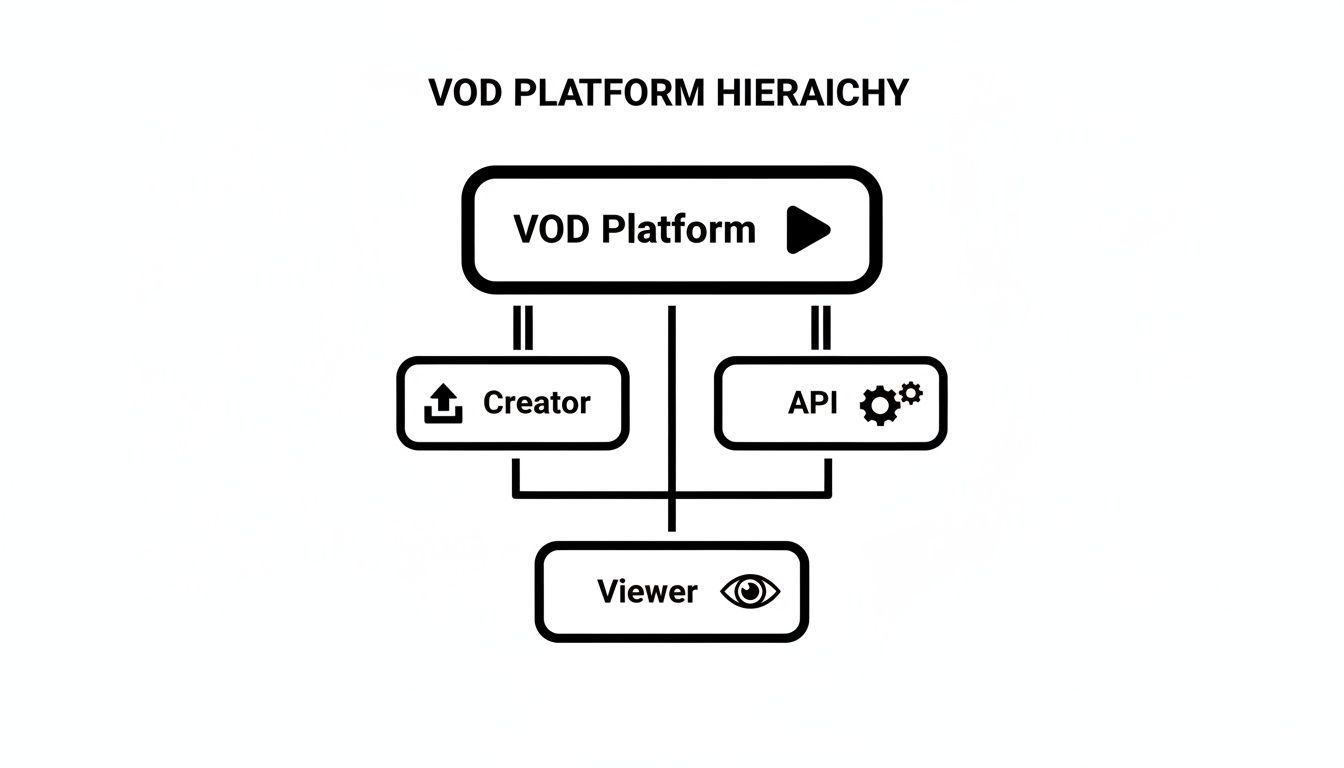
This really brings home how the API acts as the central nervous system. It translates a creator’s actions into technical processes and then delivers the finished content to the viewer. Let’s break down each of those stages.
H3: Ingest: The Gateway for All Content
The journey starts at the ingest stage. This is the platform’s front door, where a creator uploads their original video file. It’s more than just a file transfer; a good ingest process validates the file, checks for corruption, and preps it for the next critical step. A robust system can handle all sorts of file formats and sizes, ensuring a smooth start to the whole workflow.
Modern platforms offer several ways to get content in, from a simple drag-and-drop web uploader to direct API calls that can be baked into any application. That kind of flexibility is essential for automating content pipelines.
H3: Transcoding: The Universal Translator
Once the video is safely inside, it moves to transcoding. This is easily one of the most vital—and computationally heavy—parts of the process. Here, the original high-quality file is converted into multiple different versions, each with a specific resolution and bitrate.
So, why is this necessary? Simple. A viewer on a 4K smart TV with a blazing-fast fiber connection needs a very different file than someone watching on a smartphone over a spotty 4G network. Transcoding creates a whole menu of options so the video player can dynamically pick the best one for the moment. This technique, called Adaptive Bitrate Streaming, is the secret sauce that prevents buffering. If you want to get into the weeds on this, check out our complete guide on what is video transcoding.
H3: CMS and Storage: The Digital Library
After transcoding, all those different video versions need a place to live. This is where secure storage and the Content Management System (CMS) come into play.
- Cloud Storage: The actual video files are stored on distributed cloud services like Amazon S3 or Google Cloud Storage. This makes them safe, redundant, and quickly accessible from anywhere in the world.
- Content Management System (CMS): The CMS is the organizational brain. It holds all the metadata for each video—titles, descriptions, tags, thumbnails—and, crucially, keeps track of where all the different transcoded versions are stored.
Developers can use an API to manage this entire library programmatically, letting them update metadata, build playlists, or set access rules without ever having to manually touch a file.
A well-designed VOD architecture abstracts away the messy reality of file management. Developers interact with a clean, logical content library via the API, while the platform juggles the physical storage and versioning in the background.
The table below breaks down these core components and their roles.
Core Components of VOD Platform Architecture
| Component | Primary Function | Key Technologies |
|---|---|---|
| Ingest | Securely receives and validates raw video files from creators. | Web Uploader, S3 Direct Upload, Server-Side API |
| Transcoding | Converts the source video into multiple formats and resolutions. | FFmpeg, AWS Elemental MediaConvert, Zencoder |
| Storage | Securely stores and manages the original and transcoded video files. | Amazon S3, Google Cloud Storage, Azure Blob Storage |
| CMS | Organizes video assets and associated metadata. | Custom-built databases, Headless CMS, API-driven logic |
| CDN | Caches and delivers video content from servers close to the viewer. | Cloudflare, Fastly, Amazon CloudFront |
| Player | Plays video on the viewer’s device and handles adaptive streaming. | Video.js, HLS.js, Shaka Player, Native SDKs |
Understanding this stack shows how each piece is essential for delivering a seamless final product.
H3: Player and CDN: The Final Mile
The final pieces of the puzzle are the video player and the Content Delivery Network (CDN). When a viewer hits “play,” the CMS hands the player a manifest file, which is basically a list of all the available video versions.
The video player is the user-facing part of the operation. It’s smart enough to read the manifest, detect the viewer’s internet speed in real-time, and seamlessly switch between video qualities to deliver that perfect, buffer-free playback we all expect.
At the exact same time, the CDN is doing its job. A CDN is a global network of servers that keeps copies of your video files in locations physically close to your viewers. Instead of pulling a video from a single server halfway across the world, the CDN delivers it from a local server just down the road. This dramatically cuts down latency and makes everything load faster, ensuring a professional viewing experience, every single time.
What Every Great VOD Platform Needs to Succeed
Having a solid technical architecture is a great start, but it’s the features layered on top that truly make or break the user experience and, ultimately, your business. A modern on-demand video platform is far more than just a place to store videos. It’s a complete ecosystem designed to deliver buttery-smooth playback, protect your valuable content, open up revenue streams, and give you a deep understanding of your audience.
Without these key ingredients, even the most powerful backend will struggle to keep viewers coming back. Let’s break down the non-negotiable features that elevate a simple video library into a platform people love to use.
Flawless Playback with Adaptive Bitrate Streaming
Nothing sends a viewer scrambling for the “close tab” button faster than the dreaded buffering wheel. Adaptive Bitrate Streaming (ABR) is the magic that makes this a non-issue.
Here’s how it works: during the transcoding phase, your platform creates several versions of the same video, each at a different quality level. The video player then acts like a smart traffic controller, constantly monitoring the viewer’s internet speed and device. It automatically serves the highest quality stream their connection can handle without a hitch. If their Wi-Fi signal suddenly weakens, the player instantly and seamlessly switches to a lower-quality version to prevent any buffering. This is the secret sauce for delivering a professional viewing experience, whether someone is watching in stunning 4K on a fiber connection or on their phone with a spotty mobile signal.
Rock-Solid Content Security and DRM
Your video library is a valuable asset, and you need to protect it from piracy and unauthorized sharing. While basic security helps, if you’re dealing with premium content, Digital Rights Management (DRM) is absolutely essential. Think of DRM as a digital lock and key system that uses powerful encryption and licensing rules to control exactly who can watch your content and how.
The main players in the DRM space are:
- Google Widevine: The go-to for Android devices, Chrome, and Firefox.
- Apple FairPlay: A must-have for Safari, iOS, tvOS, and the entire Apple ecosystem.
- Microsoft PlayReady: Crucial for Windows, Xbox, and other Microsoft products.
Juggling these different DRM systems can be a massive headache for developers. This is where an API-first platform really proves its worth by managing all the complex licensing and encryption workflows for you. If you want to go deeper, we’ve got a full breakdown on DRM for video that explains how it all works.
Actionable Insights Through Video Analytics
You can’t grow what you don’t measure. Powerful video analytics are your window into the mind of your audience, allowing you to stop guessing and start making data-driven decisions about your content.
Analytics transform raw viewership data into a clear story about what your audience loves, what they ignore, and where they lose interest. This feedback loop is crucial for optimizing content and maximizing engagement.
Key metrics like viewer engagement, play rates, drop-off points, and where your viewers are located are goldmines of information. This data helps you pinpoint your hit content, understand viewing habits, and fine-tune your strategy to give your audience more of what they want.
Flexible Monetization Models
A great VOD platform needs a smart way to make money. The best model for you will depend entirely on your content and who you’re trying to reach.
Generally, you have three main options:
- Subscription Video on Demand (SVOD): This is the “all-you-can-eat” model popularized by giants like Netflix. Viewers pay a recurring fee for unlimited access to your library, giving you a predictable revenue stream.
- Transactional Video on Demand (TVOD): Users pay for specific content, either buying it outright (Electronic Sell-Through) or renting it for a limited time (Pay-Per-View). This is perfect for new movie releases or one-off live events.
- Advertising Video on Demand (AVOD): You offer content for free and make money by showing ads, just like YouTube. This is a fantastic way to attract the largest possible audience.
Right now, the subscription model is king. The global SVOD market is projected to hit an incredible US$90.88 billion by 2025, showing just how much consumers love the all-access pass.
Choosing the right features is a big decision. A platform built around a powerful API, like LiveAPI, makes it much simpler to implement 4K streaming, robust security, and deep analytics without getting bogged down in building everything from scratch.
Integrating VOD into Your App with an API
Okay, we’ve talked about the architecture diagrams and feature lists, but this is where the rubber meets the road. For any developer, the real magic of an on-demand video platform comes alive through its API. Instead of getting bogged down for months building a complex video infrastructure from scratch, you can plug powerful VOD functionality directly into your application. Often, it just takes a few lines of code.
This API-first approach completely changes the game. It turns video from a massive, resource-draining engineering problem into a straightforward, manageable feature. Let’s walk through the typical workflow to see just how quickly you can get professional-grade video up and running in your own app.
The Developer Workflow: A High-Level Roadmap
When you integrate video using an API, you’re essentially following a logical, step-by-step process. The whole point is to abstract away the heavy lifting—things like transcoding, storage, and global delivery—so you can focus on what matters: your app’s user experience.
The journey from a raw video file on your computer to a high-quality stream playing in your app is surprisingly direct. Here’s how it usually works when using a service like LiveAPI:
- Authentication: First things first, you have to secure the connection. You’ll generate API keys from the platform’s dashboard, and these credentials will authenticate every request your application makes.
- Video Upload: Next, you’ll make an API call to upload a video file. This can be done from your own server, or you can generate a secure, one-time upload URL. This second method is great because it lets your users upload directly from their browser, which means their massive video files never even touch your infrastructure.
- Transcoding and Processing: The moment the upload finishes, the platform’s backend automatically kicks off the transcoding process. This is basically a “fire-and-forget” operation. You don’t have to do anything else while the platform creates all the different quality versions needed for adaptive bitrate streaming.
- Receiving the Playback URL: Once the video is processed, the API gives you back a simple, embeddable stream URL. This one link points to a manifest file that tells the player where to find all the different quality levels.
- Embedding the Player: The final step is to drop a video player into your app’s front end and feed it that stream URL. The player takes it from there, automatically delivering a smooth, buffer-free experience to your users.
This entire sequence can be done in minutes, not months. The API handles the entire messy video pipeline behind the scenes, letting you innovate on your product instead of becoming a video engineer overnight.
The core benefit of an API-first approach is radical simplification. It reduces a complex, multi-stage video processing pipeline into a series of simple, predictable API calls, slashing development time and operational overhead.
Bringing It to Life with Code
To make this more tangible, let’s look at what this actually looks like in practice. The exact syntax will differ between platforms, but the core concepts are universal across modern VOD APIs.
Let’s say you want to upload a new video. Your backend application would simply make a POST request to the VOD platform’s endpoint for creating a new video asset.
POST /api/v1/videos { “title”: “My Awesome Product Demo”, “description”: “A quick walkthrough of our new features.” }
In return, the API would respond with a unique ID for that video and a secure upload link. Your application would then use that specific link to push the actual video file up to the platform.
Once the upload and transcoding are finished, you can check on its status by querying the API with the video ID. This will give you all the details, including the all-important stream URL.
GET /api/v1/videos/{video_id} { “id”: “vid_12345abcde”, “title”: “My Awesome Product Demo”, “status”: “ready”, “playback_url”: “https://cdn.liveapi.com/path/to/manifest.m3u8” }
With that playback_url in hand, you just plug it into a player on your website or mobile app, like Video.js for example.
And just like that, you have a fully functional, high-quality video player embedded right in your application. The platform is handling all the complexity—secure storage, global delivery via a CDN, and adaptive bitrate streaming. This freedom is the real goal here; it lets developers get back to building unique features and a great user experience.
How to Choose the Right VOD Platform
Picking the right foundation for your video project is one of the most important decisions you’ll make. An on demand video platform isn’t just a service; it’s the engine that powers everything—from content delivery and user experience to your ability to grow.
The right partner fits your technical needs, business goals, and budget, giving you a solid base to build upon. The wrong choice? You could be looking at performance bottlenecks, security holes, and hidden costs that sink your project before it even gets going.
Evaluate Scalability and Performance
Picture this: your video goes viral overnight. Can your platform handle a sudden jump from a few hundred viewers to a few hundred thousand without melting down? This is where scalability isn’t just a buzzword; it’s a must-have.
A platform built for scale should handle traffic spikes gracefully, automatically spinning up resources when needed. Its performance is also tied directly to its Content Delivery Network (CDN). A global CDN makes sure your videos load quickly for viewers anywhere by caching them on servers close by. Less buffering, happier users. When you’re shopping around, always ask about their CDN setup. For a deeper look, check out our guide on choosing the best CDN for video streaming.
Prioritize Robust Security Measures
Your video content is a valuable asset. Protecting it from piracy and unauthorized access has to be a top priority. A secure VOD platform should offer a multi-layered defense to keep your content locked down.
Here’s what to look for:
- Encryption: Your video files should be encrypted both at rest (in storage) and in transit (during playback). This is the bare minimum.
- Digital Rights Management (DRM): For premium content, technologies like Google Widevine and Apple FairPlay offer serious, device-level protection to stop illegal downloads and sharing.
- Access Control: Tools like domain restriction, geo-blocking, and expiring links give you fine-tuned control over who can watch your videos and where they can be embedded.
Choosing a platform without strong security is like leaving the vault door wide open. Prioritizing features like DRM and comprehensive access controls is not an optional extra—it’s a fundamental requirement for protecting your revenue and intellectual property.
Assess API Flexibility and Developer Experience
For any developer, the quality of a platform’s API can make or break the project. A well-documented, flexible API is the difference between a smooth integration that takes a few days and a frustrating slog that takes months. It’s what lets you build a truly custom video experience and automate your entire workflow.
A great, developer-friendly API comes with clear documentation, client libraries for common languages, and a logical structure that just makes sense. You should be able to upload videos, manage metadata, and configure a player programmatically, without ever having to touch a dashboard. An API-first platform like LiveAPI is designed for this exact purpose, letting you focus on your application instead of wrestling with video plumbing.
Compare and Contrast Pricing Models
Finally, let’s talk money. The platform’s pricing has to make sense for your business model and budget. With the global video on demand market expected to hit USD 198.3 billion in 2025 and an eye-watering USD 855.9 billion by 2035, the financial stakes are massive. You can read more about this growth over at GMI.
You’ll generally run into two main pricing structures:
- Subscription-Based: You pay a flat monthly or annual fee, which usually comes with set limits on storage, bandwidth, or features. This model gives you predictable costs, which is great for budgeting.
- Pay-As-You-Go (Usage-Based): You’re billed only for what you actually use—minutes of video stored, hours of transcoding, and gigabytes of bandwidth delivered. This approach is incredibly flexible and often more cost-effective, especially if your traffic tends to spike or is hard to predict.
Got Questions About VOD Platforms? We’ve Got Answers.
Jumping into the world of video can feel like learning a new language. You’ve got acronyms, technical jargon, and a dozen different ways to get from point A to point B. Even with an on demand video platform doing the heavy lifting, it’s totally normal to have questions about how all the pieces fit together.
Let’s clear up some of the most common questions that pop up for developers and business owners alike. These answers should help you connect the dots and feel more confident about your video strategy.
VOD vs. Live Streaming: What’s the Real Difference?
This is easily the most common point of confusion. While both VOD and live streaming send video over the internet, they are fundamentally different beasts, built for completely different purposes.
Think of an on demand video platform as a massive digital library. It’s filled with pre-recorded content—movies, courses, tutorials—that your audience can browse and watch on their own schedule. Everything is about storage, organization, and reliable playback of existing files. Netflix and YouTube are the titans of this space.
Live streaming, on the other hand, is like a live TV broadcast. It’s all about the “right now.” Whether it’s a major sports final, a company all-hands meeting, or a product launch, the goal is to beam that video out to the world in real-time with as little delay as possible.
VOD is about the past (what’s already been recorded), while live streaming is about the present (what’s happening now). A truly comprehensive video experience often needs both.
Thankfully, you don’t always have to choose. Modern platforms like LiveAPI wrap both VOD and live streaming capabilities into a single, unified API. This gives you the power to build a rich media library and host engaging live events, all from one place.
How Much Does It Really Cost to Build a VOD Platform?
This is the million-dollar question—sometimes literally. The cost of getting a VOD platform off the ground can swing from pocket change to a massive capital investment, and it all boils down to your approach.
If you decide to build everything from scratch, buckle up. You’re looking at a huge upfront investment in servers for storage and transcoding, a long and expensive software development cycle for your CMS and video player, and steep ongoing operational costs for CDN bandwidth. This route can easily soar into the tens or even hundreds of thousands of dollars before you’ve even signed up your first user.
This is where a Video Platform as a Service (VPaaS) like LiveAPI completely changes the game. It flips the financial model on its head, turning a daunting capital expense into a predictable operational cost.
- Zero Infrastructure Investment: Forget buying, racking, and maintaining servers. That’s all handled for you.
- Drastically Reduced Dev Time: You’re integrating a battle-tested system, not reinventing the wheel from the ground up.
- Pay for What You Use: The costs scale with your success. You typically pay only for the minutes of video you store, the minutes you transcode, and the gigabytes of data your viewers stream.
This pay-as-you-go model makes launching a professional-grade video service accessible to everyone, from solo creators to enterprise teams, without needing a venture-capital-sized budget.
Why Is Adaptive Bitrate Streaming Such a Big Deal?
We’ve touched on this before, but it’s worth saying again: Adaptive Bitrate Streaming (ABR) is the single most important technology for delivering a smooth, professional-quality viewing experience.
Picture this: you’re trying to watch a 4K video on your phone while connected to spotty airport Wi-Fi. Without ABR, you’d be stuck in an endless cycle of buffering. It’s infuriating. ABR is the elegant solution to this very common problem.
During the transcoding step, the platform doesn’t just create one version of your video. It creates several different versions (called “renditions”) at various quality levels and file sizes. The video player then becomes the smart traffic cop. It constantly monitors the viewer’s internet connection speed and seamlessly switches between these renditions on the fly.
Got a great connection? It serves up the beautiful 1080p or 4K stream. Did the connection suddenly dip? It instantly flips to a 720p or 480p version to keep the video playing without a single stutter. This all happens behind the scenes, ensuring the best possible picture with zero interruptions. ABR is the foundation of a buffer-free experience, and in video, experience is everything.
How Do I Stop People from Stealing My Videos?
Protecting your content from piracy is a top concern, and rightly so. Fortunately, modern platforms give you a powerful arsenal of tools to lock down your videos.
The defense strategy is multi-layered, typically combining encryption, Digital Rights Management (DRM), and other access controls.
- Encryption: At its core, this means scrambling the video data so it’s unwatchable without the correct digital key. Think of it as the basic lock on your front door.
- Digital Rights Management (DRM): This is the high-tech security system. DRM technologies like Google Widevine, Apple FairPlay, and Microsoft PlayReady enforce strict licensing rules that can block unauthorized copying, screen recording, and illegal sharing.
- Access Controls: Simple tools can be incredibly effective. Features like domain restriction let you create a whitelist, ensuring your videos will only play when embedded on the websites you’ve approved.
An API-first platform like LiveAPI takes the complexity out of this. It bakes these security measures right into the workflow, giving you simple toggles and API calls to enable encryption and control access. You get to protect your valuable assets without needing a Ph.D. in cybersecurity.
Ready to stop worrying about video infrastructure and start building amazing experiences? LiveAPI provides a complete, API-first solution for on-demand and live video, handling everything from transcoding and storage to security and global delivery. You focus on what makes your app special; we’ll handle the video.
Explore our powerful video APIs and get started today at liveapi.com