When we talk about Quality of Experience, or QoE, we’re getting to the heart of what really matters: how a person feels when they use your service. It’s not just about the technical specs; it’s about the overall satisfaction—or frustration—a viewer has with your video stream. Think of it as the ultimate report card on user happiness.
What Is Quality of Experience, Really?

Let’s use an analogy to cut through the jargon. Imagine you’re at a high-end restaurant. The quality of the ingredients, the precise oven temperature, the exact recipe—these are all technical details. In the streaming world, this is Quality of Service (QoS). It’s the collection of objective, measurable data points.
But your actual experience is about so much more, isn’t it? It’s the restaurant’s atmosphere, the beautiful plating, the incredible taste, and the waiter who anticipates your needs. That holistic, personal feeling is the Quality of Experience (QoE).
You could have the best ingredients in the world (great QoS), but if the food arrives cold and the service is terrible, your QoE is in the gutter. The exact same principle applies to video streaming.
The Human Element in Tech
This focus on the human side of things really is a game-changer. It forces us to shift our thinking from “Is our network performing correctly?” to the more important question: “Are our users actually happy?” This matters because your audience doesn’t care about your packet loss rates or server uptime. They just want their video to start instantly and play flawlessly.
The International Telecommunication Union (ITU) formalizes this idea, defining QoE as ‘the overall acceptability of an application or service, as perceived subjectively by the end-user.’ The key word there is subjectively. It’s all about perception. For a more academic take, you can see how this is discussed on TechTarget.com.
QoE answers the ultimate business question: “Did our user have a good time?” It’s the critical link between technical performance and real-world business outcomes like keeping customers around and building brand loyalty.
At the end of the day, understanding QoE means remembering that technology is built to serve people. All the complex backend processes, like video transcoding, exist for one reason: to create a smooth, enjoyable experience for the person on the other side of the screen.
QoE vs QoS: Understanding What Truly Matters to Users
To really get a handle on Quality of Experience, we first need to separate it from its technical cousin, Quality of Service (QoS). It’s a common trap for engineering teams to obsess over QoS metrics, thinking that a high-performing network automatically creates happy users. But that’s only half the story.
QoS is all about the cold, hard facts of your delivery infrastructure. It answers technical questions like, “What’s our network’s bandwidth?” or “How high is the latency?” These are the raw, objective numbers that describe the potential of your system.
QoE, on the other hand, is the human side of the equation. It’s the subjective outcome of all that technical performance, answering the one question that ultimately impacts your business: “Did my user have a good time, or were they pulling their hair out in frustration?”
The Highway Analogy
Think of it like driving on a brand-new superhighway. The QoS metrics are fantastic:
- Eight perfectly paved lanes (that’s your high bandwidth)
- A speed limit of 75 mph (think low latency)
- No potholes or debris (zero packet loss)
On paper, everything is set for a perfect drive. But then, a minor fender-bender happens miles ahead, and suddenly you’re stuck in a massive traffic jam. Your actual experience—your QoE—is terrible. You’re annoyed, late, and not going anywhere. The network’s potential (QoS) was top-notch, but the end result for the user (QoE) was a disaster. This happens all the time in video streaming.
A flawless network connection doesn’t guarantee a flawless viewing experience. QoE is the final verdict on whether the entire end-to-end system—from server to screen—successfully delivered on its promise to the user.
Why This Distinction Is Critical
So, why does this matter so much? Focusing only on QoS is like a chef tasting each ingredient individually but never tasting the final dish. A fantastic stream relies on much more than just network speed. Things like the video player’s performance, the viewer’s device capabilities, or even clunky application code can ruin the experience, leading to poor QoE even when the QoS is great.
Let’s break down the key differences.
QoE vs QoS: A Quick Comparison
This table puts the fundamental differences between Quality of Experience and Quality of Service side-by-side.
| Attribute | Quality of Service (QoS) | Quality of Experience (QoE) |
|---|---|---|
| Focus | Network and system performance. | The end-user’s perception and satisfaction. |
| Nature | Objective and technical. | Subjective and perceptual. |
| Measurement | Quantifiable metrics like bandwidth, latency, packet loss, and jitter. | Subjective scores (MOS) and objective metrics that impact perception (rebuffering, startup time, visual quality). |
| Scope | Measures specific components of the delivery chain (e.g., CDN, ISP). | Measures the entire end-to-end user journey, from server to screen. |
| Key Question | “How well is the network performing?” | “Is the user having a good experience?” |
Ultimately, while you need good QoS to even have a chance at good QoE, the former doesn’t guarantee the latter.
The whole concept of QoE gained traction when the industry realized that simply measuring network stats wasn’t enough. For years, performance was judged by numbers like bandwidth and packet loss, but that approach completely missed the user’s perspective. In the late 2000s, groups like the European Telecommunications Standards Institute (ETSI) began to formalize the idea that QoE must cover the entire system.
Getting this right helps your team put its energy in the right place. Instead of just throwing more money at server capacity, you might discover that optimizing your video player’s startup time has a much bigger impact on user happiness. When you prioritize QoE, you shift your focus from abstract network stats to the real, tangible experience that keeps viewers coming back.
How to Actually Measure Quality of Experience
Because QoE is all about how a person feels about their streaming experience, measuring it can seem a bit like trying to bottle lightning. How do you put a number on a subjective feeling?
The secret is to tackle it from two angles at once: by listening to what your users are actually telling you, and by digging into the technical data that’s shaping their experience behind the scenes. This dual approach helps you connect the dots between hard numbers and human happiness, giving you a complete picture of your stream’s performance.
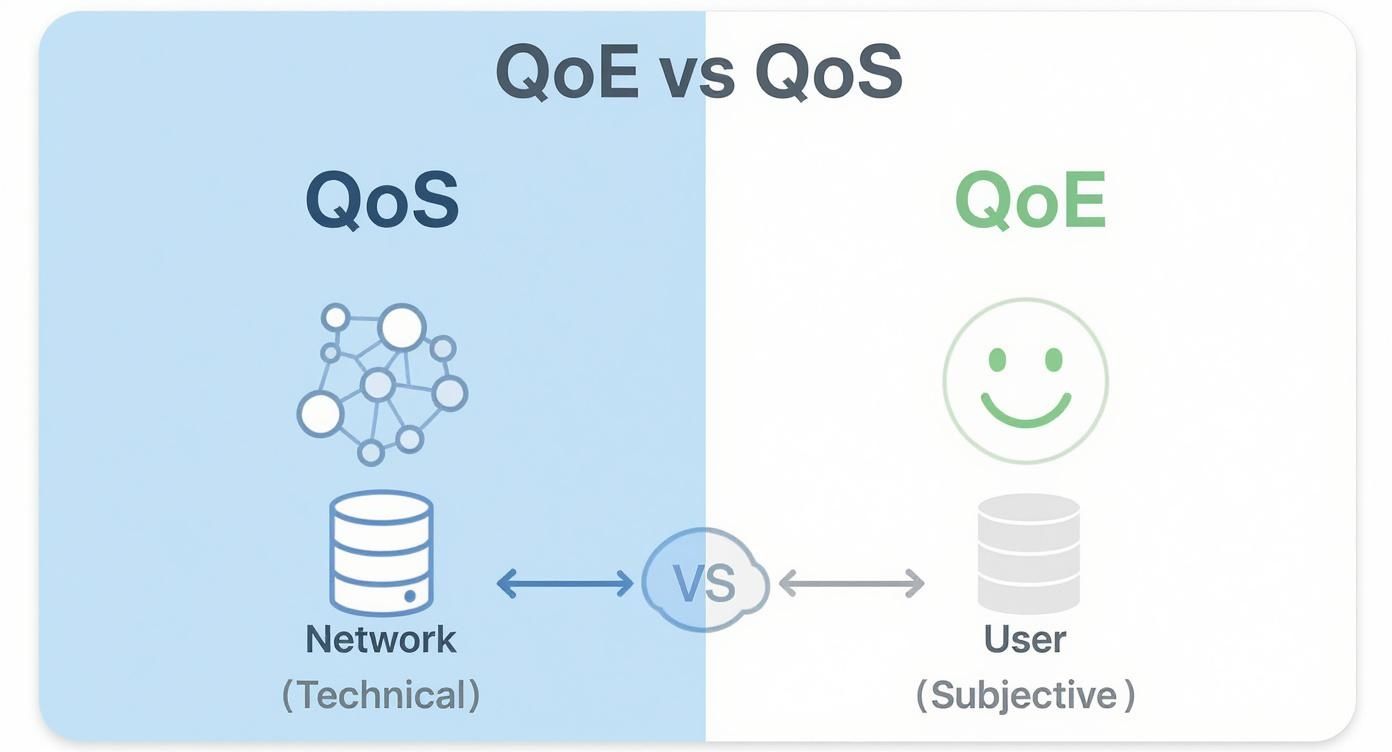
As you can see, QoS is all about the plumbing—the network’s raw ability to deliver data. QoE, on the other hand, is about the end result: was the user happy with what came out of the faucet?
The Subjective Approach: Listening to Your Audience
The most straightforward way to find out what people think is… to ask them. This is the heart of subjective testing, where you collect direct feedback on how viewers perceive the quality of a video.
The industry gold standard here is the Mean Opinion Score (MOS). It’s a simple 1-to-5 scale where users rate their experience—1 being “unusable” and 5 being “excellent.” By polling a group of viewers, you get an aggregate score that gives you a solid, albeit subjective, benchmark for quality. You can learn more about how MOS is used on TechTarget.com.
Of course, getting MOS data from every single user isn’t practical. This kind of testing is often done in controlled lab environments or through simpler in-app prompts, like asking viewers for a quick star rating or a thumbs-up.
The Objective Approach: Analyzing Technical Indicators
Subjective feedback is crucial, but it only tells you what happened, not why. If a user gives a 2-star rating, was it because of buffering? A pixelated image? A long startup time? That’s where objective metrics come in.
These are the cold, hard data points collected from the user’s device or video player that have a direct impact on their perception of quality.
Think of them as the vital signs of your stream:
- Video Startup Time: This is the wait time between a user hitting play and the first frame appearing. Once this creeps past 2 seconds, viewers start to lose patience and may abandon the stream altogether.
- Rebuffering Ratio: The percentage of viewing time a user spends staring at a spinning wheel. Nothing kills the mood faster than constant buffering. It’s a primary driver of viewer frustration.
- Bitrate Stability: How well your stream maintains a high-quality picture. Frequent, jarring shifts from crisp HD to a blurry, low-resolution version can be just as annoying as a full-on stall.
Beyond these core metrics, some incredibly smart models use algorithms to predict how a human would rate a video’s quality without actually having to ask them.
- VMAF (Video Multimethod Assessment Fusion): This is an open-source model developed by Netflix. It uses machine learning to predict perceived video quality, often proving more accurate than older, simpler metrics.
- SSIM (Structural Similarity Index Measure): This metric compares a compressed video frame to the original, uncompressed version to measure how much quality was lost. It’s great for assessing the impact of video compression.
By keeping a close eye on these objective numbers, you can spot problems early, diagnose the root cause of a poor experience, and fix issues before they frustrate a large chunk of your audience.
The Key Factors That Make or Break Streaming QoE
Delivering a great Quality of Experience is a bit like a relay race. Multiple stages in the video pipeline have to hand off the stream perfectly, and a single dropped baton—whether at content creation or final playback—can turn a high-definition dream into a buffering nightmare. Knowing where things can go wrong is the first step to building a streaming service that people love.
The journey starts with content encoding and packaging. This is where the raw video gets compressed and prepared for its trip across the internet. If you get this wrong, you might end up with poor visual quality or massive files that strain the entire delivery system right from the get-go.
Next, the stream is passed to a Content Delivery Network (CDN). The CDN’s whole job is to stash copies of your video on servers all over the world, getting it physically closer to your viewers. Your choice of CDN and how you set it up has a massive impact on speed and reliability, directly affecting how quickly and consistently your stream lands on screens everywhere.
Navigating the Last Mile
Even with flawless server-side prep, the stream still has to cross the “last mile.” This is that final, unpredictable hop over local ISP networks and home Wi-Fi to reach the viewer. It’s the wild west of the internet, prone to congestion and interference that are completely out of your control.
This is exactly why Adaptive Bitrate (ABR) streaming is so crucial.
ABR works by creating several versions of your stream at different quality levels, from crisp HD down to a more modest resolution. The viewer’s video player constantly monitors their network connection and automatically picks the best-quality version they can handle without stuttering. If their Wi-Fi signal suddenly weakens, the player smoothly downshifts to a lower-quality stream to keep the video playing.
When ABR is working as it should, the viewer might see a brief dip in sharpness but completely avoids that dreaded spinning wheel. That trade-off is almost always worth it, since audiences consistently point to buffering when streaming as the single most infuriating part of the experience.
The Player and the Device
Finally, the stream reaches its destination: the user’s device and video player. The player isn’t just a passive window; it’s an active participant in the QoE equation. Its internal logic is responsible for a lot:
- Startup Delay: A clunky player can add precious seconds to the initial load time, testing a viewer’s patience before they’ve even seen a single frame.
- Latency in Live Streams: For live events, the player’s job is to close the gap between what’s happening in real-time and what’s on screen. Every millisecond counts.
- Resolution Consistency: A smart ABR algorithm inside the player makes the shifts between quality levels feel seamless, not jarring.
Every one of these stages—encoding, CDN delivery, last-mile resilience, and player intelligence—is a vital link in the chain. If one link breaks, the whole experience suffers. That’s why you can’t just focus on one area; you need to monitor the entire journey to truly understand and improve QoE for your audience.
Actionable Strategies to Monitor and Improve QoE
Knowing what QoE is and which metrics matter is one thing, but actually improving it is where the real value lies. To move from theory to practice, you need a solid monitoring strategy that gives you a complete picture of the entire viewer journey, all the way from your server to their screen.
This means collecting data from every step of the delivery chain. Server-side logs are great for checking on your infrastructure, but client-side analytics are non-negotiable. By embedding an analytics SDK directly into your video player, you capture the ground truth—what your users are actually experiencing on their devices.
Building Your QoE Monitoring Toolkit
Good monitoring isn’t about collecting every piece of data imaginable; it’s about tracking the right metrics and turning them into real insights. Your dashboard should be a smart mix of technical performance data and user perception metrics.
Here’s what your monitoring strategy should cover:
- Real-Time Anomaly Detection: Set up alerts to flag sudden spikes in rebuffering, slow startup times, or playback errors. Catching problems the moment they happen lets you fix them before they affect a huge chunk of your audience.
- Performance Segmentation: Break down your QoE metrics by different factors. Are users on a specific browser, device, or internet provider having a worse time? This helps you zero in on the root cause of problems much faster.
- Historical Trend Analysis: Keep an eye on performance over time. This helps you understand how new features, player updates, or changes to your CDN are affecting the viewer experience, proving that your optimization work is paying off.
This kind of proactive monitoring is crucial. There’s often a huge gap between what providers think they’re delivering and what viewers actually get. Industry insights show that while about 50% of service providers believe they meet subscriber expectations, over half of them aren’t even measuring QoE or are unsure if their methods work.
Proactive Steps for Superior Streaming
Once you have a clear view of your stream’s performance, you can start making targeted improvements. A few smart tweaks to your delivery workflow can lead to massive gains in user satisfaction and keep viewers coming back.
It all starts with a smart CDN strategy. Using a multi-CDN setup gives you redundancy and makes sure your content is always delivered from the best possible location for each viewer, which cuts down on latency and boosts throughput. Platforms like LiveAPI make this easy by integrating with top-tier CDNs to automatically route traffic for peak performance.
Next, turn your attention to the video player and your encoding settings. The player is your final touchpoint with the viewer, so make sure it’s optimized for quick startups and smart bitrate switching.
The goal is not just to measure Quality of Experience, but to actively engineer it. By combining detailed analytics with a refined delivery strategy, you can move from reacting to user complaints to proactively crafting a flawless viewing journey.
A well-designed Adaptive Bitrate (ABR) ladder is a key part of this. It gives the player a wide range of quality levels to choose from, which allows for seamless transitions between them without jarring shifts in quality or, worse, buffering. To learn more about this, check out our guide on how Adaptive Bitrate Streaming works. Getting these elements right turns QoE from an abstract idea into a real competitive advantage.
Your QoE Questions, Answered
Let’s dig into some of the most common questions that pop up when teams start getting serious about Quality of Experience. These answers should help connect the dots between the technical concepts and what they mean for your product and your audience.
What Is the Single Most Important Metric for Video QoE?
If you had to pick just one, it’s almost always the rebuffering ratio. Nothing makes viewers abandon a stream faster than having it freeze mid-play. Study after study shows that even the slightest interruption is the number one reason people give up and leave.
A quick startup is great, and everyone appreciates a crisp picture, but uninterrupted playback is the foundation of a good experience.
That said, context is everything. For a live football game, low latency might be the most critical factor—no one wants spoilers from social media before they see the play. For someone settling in to watch a 4K blockbuster on their new TV, the bitrate and visual fidelity will probably matter most. But for general viewing, rebuffering is the ultimate experience killer.
Can You Have Good QoS but Bad QoE?
Absolutely. This happens all the time, and it’s the perfect example of why focusing only on network stats is a huge mistake.
Picture this: your user has a blazing-fast gigabit fiber connection. From a network perspective, their Quality of Service (QoS) is perfect. But if your video player is buggy, your servers are struggling to keep up, or your encoding profiles are poorly configured, their experience will still be awful. They’ll get stuck with slow load times, endless buffering wheels, and a pixelated mess.
In this classic scenario, the network delivered flawlessly, but the overall service failed the user. It’s a stark reminder that QoE is the result of the entire delivery chain working together, not just one strong link.
How Can Our Team Start Measuring QoE Right Now?
The fastest way to get started is to integrate a client-side analytics SDK directly into your video player or app. These tools are built to capture objective QoE metrics right from the viewer’s device, giving you a direct line of sight into what’s actually happening.
This approach gives you immediate, real-world data on crucial performance indicators:
- Startup Time: How many seconds from click-to-play?
- Rebuffering Events: How often did playback stall, and for how long?
- Playback Errors: Did the stream fail to load or crash partway through?
This raw data gives you an instant snapshot of performance. To round out the picture, you can complement these objective numbers with a simple feedback tool, like an in-app prompt asking viewers to “rate this stream.” This helps you gather subjective feedback and start connecting the dots between technical metrics and actual user happiness.
Why Is QoE So Important for Business Success?
Because at the end of the day, Quality of Experience is a direct reflection of customer satisfaction. In today’s crowded streaming market, people have very little patience for services that don’t work smoothly. A consistently high QoE is what builds loyalty and keeps your audience watching longer.
A great viewing experience translates directly into the business metrics that matter:
- Longer Watch Times: When a stream is seamless, people stick around.
- Higher Engagement: Happy viewers are more likely to interact, subscribe, and come back for more.
- Lower Churn: A reliable, buffer-free experience is one of your most powerful retention tools.
Ultimately, poor QoE leads straight to customer support tickets, bad app store reviews, and viewers canceling their subscriptions. Investing in how you monitor and improve QoE isn’t just a technical task—it’s a direct investment in the health and growth of your business. It’s about making sure the experience you deliver is as compelling as the content itself.
Ready to stop guessing and start engineering a superior viewing experience? LiveAPI provides developers with robust tools for live streaming and on-demand video, including detailed analytics to monitor and master QoE. Build your application with our powerful video infrastructure at https://liveapi.com.