We’ve all seen it: the dreaded spinning wheel. That frustrating pause in your video stream is called buffering, and it happens when the video player runs out of data to show you. In short, the video can’t download fast enough to keep up with playback.
Fixing it for good means looking beyond just the viewer’s internet speed and digging into the entire delivery chain—from your server, through the network, all the way to the user’s device.
Deconstructing the Causes of Video Buffering
When a user complains about a choppy stream, it’s easy to point the finger at their Wi-Fi. And while that’s often part of the story, for developers and streaming engineers, that’s just scratching the surface. To really solve buffering, you need to think like a detective, breaking the problem down into three main areas: the client, the network, and the server.
Each of these domains has its own set of potential traps that can ruin a viewer’s experience, either on their own or by ganging up together.
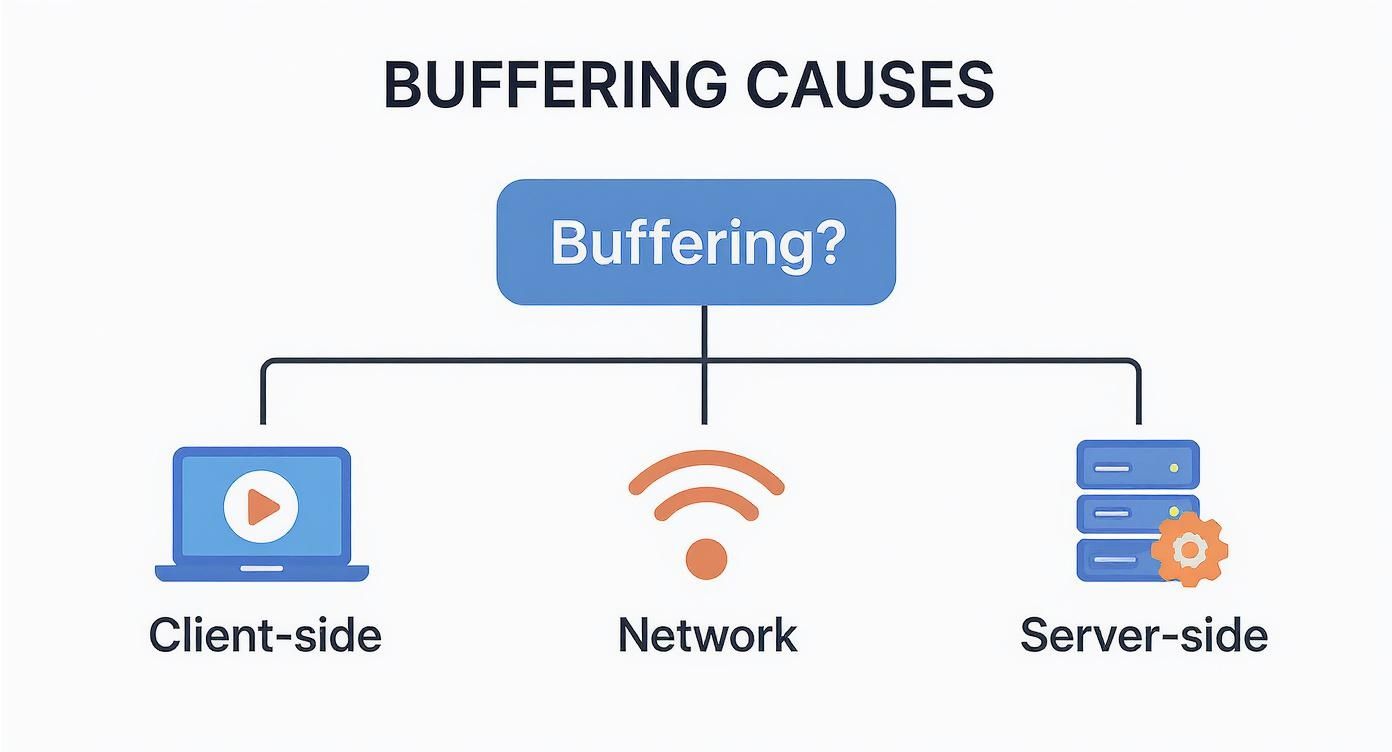
This mental map helps organize the investigation, letting you trace issues from the viewer’s screen all the way back to your origin server.
Client-Side Bottlenecks
The final stop for your video stream is the user’s device and player, but this last mile can often be the source of the problem. An old browser, a phone struggling with limited processing power, or a badly configured video player can all fail to handle the incoming video segments smoothly.
Even something as simple as a dozen other apps running in the background can hog the CPU and memory, leaving the video player starved for resources.
Here’s what to look out for on the client side:
- Device Performance: Older smartphones or budget laptops might choke when trying to decode high-resolution or high-framerate streams.
- Player Configuration: Default buffer settings are often too conservative. They may not build up a big enough data reserve to survive even minor network hiccups. The player’s Adaptive Bitrate (ABR) logic might also be too slow to switch to a lower-quality stream when the connection gets shaky.
- Software Issues: Outdated browsers or buggy streaming apps can absolutely cripple playback performance.
Network and CDN Hurdles
The journey from your server to the viewer’s screen is where some of the trickiest buffering issues live. Network congestion is the classic villain here—whether it’s happening on the user’s crowded home Wi-Fi or deep within an ISP’s network. When data packets get delayed or dropped, the player is left waiting.
But it’s not just about local congestion. Your Content Delivery Network (CDN) plays a massive role. Is it smart enough to route the viewer to the closest, fastest edge server? Or is it sending them on a detour across the country? A low cache-hit ratio is another red flag, as it means the CDN is constantly going back to your origin server for content, adding a ton of latency.
A key metric I always watch is the rebuffering ratio. This tells you what percentage of a viewer’s session was spent staring at a frozen screen. A low number here is a direct sign of a smooth, high-quality experience.
Server-Side and Encoding Inefficiencies
Finally, the problem might be starting right at the source. If your origin server is overloaded or misconfigured, it simply can’t feed video segments to the CDN fast enough. This creates a bottleneck at the very beginning of the chain that affects every single viewer, no matter how fast their connection is.
How you encode your video is also a huge factor. An inefficient encoding profile can create video segments that are way too large for their quality level, forcing anyone on an average connection to buffer. A poorly designed ABR ladder—the different quality levels a player can switch between—with big jumps in bitrate can also cause the player to stall when it tries to shift gears.
The good news is that streaming tech is getting smarter. Recent industry data shows the average buffer ratio improved by 6%, and video start times got 13% faster in just one year. This is all thanks to better infrastructure and more intelligent delivery logic. You can discover more about these streaming quality gains and see how they’re directly impacting viewers.
To help you connect the dots, this table maps common issues to the metrics that will help you spot them.
Common Buffering Causes and Key Diagnostic Metrics
This table summarizes frequent buffering triggers and the corresponding key performance indicators (KPIs) you should be monitoring for a quick and effective diagnosis.
| Potential Cause | Primary Metric to Watch | What the Metric Indicates |
|---|---|---|
| Poor Network Conditions | Rebuffering Ratio | The percentage of time a viewer spent paused for buffering. A high ratio points directly to network instability or insufficient bandwidth. |
| Inefficient ABR Algorithm | Bitrate History | A log of bitrate switches. Frequent, erratic switching or getting “stuck” on a low bitrate suggests the ABR logic is struggling. |
| Slow Server Response | Time to First Byte (TTFB) | The time from the initial request to receiving the first piece of video data. High TTFB points to origin server or CDN latency. |
| Underpowered Device | Dropped Frames | The number of video frames the player failed to render. A high count suggests the device’s CPU/GPU can’t keep up with decoding. |
| Suboptimal CDN Routing | Edge Server Location | The physical location of the CDN server a viewer is connected to. Connecting to a distant server adds unnecessary latency. |
By keeping an eye on these specific metrics, you can move from guessing what’s wrong to knowing exactly where the bottleneck is. This targeted approach is the fastest way to resolve buffering and improve your viewers’ experience.
Fine-Tuning Your Video Player and ABR Strategy
Your video player is the last line of defense against buffering, but it’s amazing how often developers rely on out-of-the-box defaults. This is a huge missed opportunity. With some strategic tuning, you can see massive performance gains without ever touching your server-side code.
At the heart of it all is buffer management. The real challenge is finding that perfect sweet spot between a fast video start and a playback experience that can withstand a little network turbulence. A tiny initial buffer gets the video playing almost instantly, which is great, but it also means the slightest network flutter will bring everything to a halt.

Calibrating Your Player Buffer
Think of the player’s buffer like a small water reservoir for your stream. You need it to fill up quickly so playback can start, but it also needs to hold enough of a reserve to handle any “droughts” in data coming from the network.
A good starting point is to set an initial buffer target of just a few seconds. For on-demand video, 3-5 seconds is pretty standard. For live streams where every second of latency counts, you might go even lower. This gets that first frame on the screen fast, keeping impatient viewers from bouncing.
But the real magic isn’t in the initial buffer; it’s in dynamic management. Modern players are smart enough to adjust their buffer size based on what the network is doing in real time. If the connection is solid, the player might aim for a much larger buffer—say, 30-60 seconds—to build a really robust cushion. If things get shaky, it can shrink that goal to avoid wasting bandwidth on data that might never get watched.
Here’s the key takeaway: one size does not fit all. You have to test different buffer configurations across a range of devices and network profiles. A user on a spotty 4G connection has completely different needs than someone watching on a stable gigabit fiber line.
Designing a Smarter ABR Ladder
Once your buffer settings are dialed in, the next piece of the puzzle is your Adaptive Bitrate (ABR) strategy. The ABR algorithm is the brain of the operation, deciding when to switch between different quality levels (or renditions) as a viewer’s bandwidth changes. A poorly designed ABR ladder is a direct flight to buffering hell.
Your “ladder” is just the set of bitrate and resolution combinations you offer. I’ve seen so many ladders with huge, uneven gaps between the rungs—for instance, jumping straight from a 1 Mbps stream to a 5 Mbps stream. That’s a massive leap that many connections just can’t make smoothly, and it forces the player to stall.
A well-built ladder should have gradual, logical steps. This lets the player make small, almost unnoticeable adjustments up or down as bandwidth fluctuates. If you want to go deeper on this, our guide on adaptive bitrate streaming has a ton of detailed examples for crafting a solid ABR strategy.
Here are a few quick tips from the trenches for building a better ABR ladder:
- Start Low: Your lowest rendition needs to be playable on even the worst connections. Think 360p at around 400-600 kbps. This gives you a reliable fallback and prevents total playback failure.
- Smooth Transitions: Try to keep bitrate increases between consecutive rungs at roughly 1.5x to 2x. This avoids jarring shifts in quality and makes it much less likely that the player will buffer while trying to switch up.
- Cap the Top End: Don’t bother encoding a pristine 4K stream at 25 Mbps if only 1% of your audience can actually watch it without buffering. Look at your analytics and set a realistic maximum bitrate that serves the majority of your users.
Choosing the Right Segment Duration
Finally, let’s talk about the size of your video chunks, or segments. The duration of these segments has a direct impact on both latency and how quickly your ABR logic can react.
- Shorter Segments (1-2 seconds): These are perfect for low-latency live streaming. The player can download them faster and respond more nimbly to bandwidth changes. The trade-off? It creates more network requests and can be a bit less efficient for CDNs to cache.
- Longer Segments (4-6 seconds): This is the go-to for VOD. It cuts down on the overhead from constant network requests and improves cache efficiency. The downside is that it makes your ABR logic less responsive; the player is stuck with a single quality level for longer, even if the network takes a nosedive.
The right choice really depends on your content. If you’re streaming an interactive live event, shorter segments are a no-brainer. For a feature film, longer segments will give you a more stable and efficient delivery. By carefully tuning your player, ABR ladder, and segment size, you can build a resilient streaming experience that stays one step ahead of that dreaded buffering wheel.
Getting Your Encoding and Packaging Workflow Right
A great viewing experience doesn’t start when a video packet hits the CDN. It starts way back at the source—with your encoding and packaging. Any missteps here will cascade through the entire delivery pipeline, and you’ll end up chasing down the very buffering streaming video issues you’re trying to prevent.
An efficient pipeline doesn’t waste a single bit. It delivers the best possible quality for a given bandwidth. This is where the real art of streaming engineering comes in: you’re constantly balancing quality, bitrate, and compatibility to build a rock-solid foundation for your video.
Choose the Right Codec and Rate Control
Your choice of codec has a massive impact on file size and, by extension, on buffering. Sure, H.264 (AVC) is still the king of compatibility, but modern codecs like H.265 (HEVC) and AV1 offer huge advantages. To put it in perspective, AV1 can deliver the same visual quality as H.264 at a 30-50% lower bitrate. That’s a game-changer, especially for viewers on spotty mobile networks.
Just as important is how you control the bitrate. There are two main approaches, and they serve very different needs:
- Constant Rate Factor (CRF): This is your go-to for video-on-demand (VOD). Instead of a rigid bitrate, CRF targets a consistent visual quality, letting the bitrate fluctuate as needed. A fast-paced action scene gets more bits, while a static landscape shot gets fewer. The result is a highly efficient encode.
- Constant Bitrate (CBR): When you’re live streaming, predictability is everything. CBR keeps the bitrate steady, which helps prevent network congestion and makes it easier for players to do their job. It’s less efficient than CRF, but that stability is absolutely critical for live events.
Build an Intelligent Encoding Ladder
Your ABR ladder—that set of different resolution and bitrate options—should never be a generic template. A one-size-fits-all approach is incredibly wasteful. A simple cartoon doesn’t need a 10 Mbps 1080p rendition any more than a high-action sports clip will look good at a low bitrate.
This is where per-title encoding becomes so powerful. This technique actually analyzes each video’s content to create a custom ABR ladder built for its specific visual complexity. You stop wasting bits on simple content and make sure complex scenes get the data they need to look sharp. This smarter approach directly reduces the load on your viewers’ connections, which means less buffering.
Don’t just copy a standard ABR ladder from a tutorial. Analyze your content and your audience’s network profiles. A custom ladder is one of the single most effective optimizations you can make to prevent buffering.
If you want to dig deeper into how this all works, our guide on what is video transcoding is a great place to start.
Packaging Formats and Segment Duration
How you package your video into formats like HLS or DASH also plays a huge part. The key variable you can control here is segment duration, which sets the size of the video chunks the player downloads.
Picking a segment duration is a classic trade-off between latency and efficiency.
- Short Segments (e.g., 2 seconds): Shorter segments let the player switch bitrates more quickly, which is great for responding to network changes and essential for low-latency live streams. The downside is more HTTP requests and header overhead, which can be less efficient.
- Longer Segments (e.g., 6-10 seconds): These are more efficient for CDNs to cache and reduce request overhead, making them a solid choice for VOD. The catch? The player is locked into a specific quality for longer, making it slow to adapt if the network suddenly tanks.
By fine-tuning your codecs, building content-aware ABR ladders, and choosing the right segment duration, you’re creating an efficient video file right from the start. Getting this part right means the rest of your delivery pipeline has a much easier job, leading directly to a smoother, buffer-free experience for your viewers.
Configuring Your CDN for Peak Delivery Performance
You can have flawless encoding and a perfectly tuned player, but your stream can still fall flat. The most common culprit? Your Content Delivery Network. Think of the CDN as the last mile—the highway system for your video. A poorly configured CDN is like a traffic jam, sending viewer requests down slow, inefficient routes that always end in that dreaded buffering icon.
Your CDN is the backbone of your entire delivery pipeline. It’s supposed to cache video segments on servers physically close to your viewers and serve them up with minimal latency. When it works, you don’t even notice it. When it doesn’t, viewers are stuck waiting, no matter how fast their home internet is.
The whole game of video delivery has changed. Back in 2005, a typical stream was maybe 300 kbit/s. Even then, serving just 1,000 simultaneous viewers meant pushing 300 Mbit/s from your server—a recipe for congestion. Today, smart CDNs and delivery logic have made a massive difference. Global platforms have seen a 6% improvement in VOD buffer ratios, which is a huge testament to just how critical this infrastructure is. You can read more about the evolution of streaming media challenges and how the industry has tackled them over the years.
Maximizing Your Cache Hit Ratio
If you track only one CDN metric, make it the cache hit ratio. This number tells you what percentage of requests were served directly from a nearby CDN edge server (a “hit”) instead of having to travel all the way back to your origin server (a “miss”).
A high cache hit ratio—ideally north of 95%—is a sign that your CDN is earning its keep. A low ratio signals a serious problem. Cache misses don’t just add a ton of latency; they also hammer your origin server with traffic it shouldn’t have to handle.
Getting this right comes down to your caching rules. Double-check your HTTP headers like Cache-Control and Expires. These tell the CDN exactly how long to hold onto your video segments. For VOD, you can set these to be quite long. For live streams, it’s a balancing act: long enough for the cache to be effective, but short enough that the player can grab new segments the moment they’re available.
The image below shows the basic CDN concept in action—distributing content from a central origin to multiple points of presence (PoPs) to get it closer to the audience.
This whole architecture is built to cut down latency by reducing the physical distance data has to travel, a fundamental strategy for preventing buffering.
Implementing a Multi-CDN Strategy
Let’s be honest: no single CDN is the best everywhere. Performance can swing wildly based on a viewer’s location, their ISP, or even the time of day. Putting all your eggs in one basket creates a single point of failure. If that CDN has a regional outage, a whole chunk of your audience is left in the dark.
This is exactly where a multi-CDN strategy pays off. By bringing two or more CDNs into the mix, you can dynamically route each viewer’s traffic to the best-performing provider for them, right now. This gives you two massive wins:
- Resilience: If one CDN has issues, traffic automatically shifts to another. Your stream stays online.
- Performance: You can play to each CDN’s strengths. A viewer in Asia gets routed to the provider with the best local peering, while a viewer in Europe gets sent to a different one.
The setup requires a load balancing service that constantly pings your CDNs and makes smart routing decisions. It’s more complex, no doubt, but for any serious streaming service, the drop in buffering and boost in reliability is worth every bit of the effort. For a deeper dive, check out our guide on choosing the best CDN for video streaming.
My pro tip is to start by digging into your CDN logs. Look for patterns. Are you seeing high latency or frequent cache misses from a specific region or ISP? That data is a goldmine. It will tell you exactly where your current CDN is falling short and give you a rock-solid case for going multi-CDN.
Advanced Edge Configurations
Modern CDNs aren’t just dumb caches anymore; they’re powerful computing platforms. With edge compute (think AWS Lambda@Edge or Cloudflare Workers), you can run your own custom logic right on the CDN servers. This opens up some really interesting ways to optimize on the fly.
For example, you could offload ABR switching logic to the edge. The edge server often has a much clearer picture of network conditions than the client does, allowing it to make smarter calls about which rendition to serve next. You could also write logic to pre-fetch the next few video segments before the player even asks for them, giving you an even bigger buffer safety net. These techniques turn your CDN from a passive delivery pipe into an active, intelligent part of your streaming stack.
Implementing Proactive Monitoring and Analytics
Fixing buffering issues after a viewer complains is a losing game. By that point, you’ve already delivered a frustrating experience, and you’re just doing damage control. The only way to build a truly resilient streaming service is to get ahead of the problem, using solid monitoring and analytics to spot trouble long before your audience does.
Building this kind of monitoring stack isn’t just about collecting logs. It’s about creating a complete, end-to-end picture of your entire delivery pipeline. You need to see what’s happening on the viewer’s device, inside your CDN, and back at your origin servers—and then connect all those dots. This is how you stop guessing about buffering streaming video and start diagnosing it with precision.
Capturing Client-Side Quality of Experience
Your most important source of truth is the viewer’s device. Client-side Quality of Experience (QoE) monitoring means grabbing performance data directly from the video player as it runs on someone’s phone, laptop, or smart TV.
This data is the real deal. It tells you exactly what the viewer is seeing, cutting through any assumptions you might have about their network or device. It’s the raw, unvarnished truth about your stream’s performance out in the wild.
The goal is to track metrics that directly map to user frustration. These aren’t just abstract server logs; they are real-time signals of a good or bad viewing session.
Think of it this way: server-side logs tell you what you delivered, but client-side QoE data tells you how it was received. The latter is what actually determines viewer satisfaction and retention.
Key QoE Metrics You Must Track
To get a clear, actionable view of performance, you don’t need hundreds of metrics. You need to zero in on a handful of critical ones. These “golden metrics” give you a high-level health check of your entire streaming ecosystem and should be the first place you look when investigating buffering.
Here’s a look at the essential metrics we monitor, what they tell you, and the targets you should be aiming for.
Essential QoE Monitoring Metrics and Targets
This table breaks down the critical Quality of Experience (QoE) metrics, what they measure, and the ideal thresholds for a high-quality streaming service. Keeping these numbers in the green is fundamental to viewer retention.
| Metric | What It Measures | Target Threshold |
|---|---|---|
| Rebuffering Ratio | The percentage of playback time spent stalled for buffering. This is a direct measure of viewer frustration. | Below 0.1% |
| Video Startup Time | The time from the user hitting “play” to the first frame of video appearing on screen. | Under 2 seconds |
| Video Start Failures | The percentage of play attempts that fail to start, excluding cases where the user exits before playback. | Below 0.5% |
| Average Bitrate | The average bitrate of the video segments being played. A consistently low average bitrate may indicate widespread network issues. | Varies by content; monitor for sudden drops |
| Playback Failures | The percentage of plays that started successfully but failed mid-stream before completion. | Below 1% |
These metrics should be front and center on your monitoring dashboard. When you see your rebuffering ratio start to creep up, you know it’s time to dig in and find out why.
Integrating the Full Data Pipeline
Client-side data is powerful, but it’s just one piece of the puzzle. To truly understand why buffering is happening, you have to correlate that QoE data with logs from your CDN and origin servers. This is how you create that complete, end-to-end view of the stream’s journey.
Let’s say a viewer in a specific region is experiencing a high rebuffering ratio. By cross-referencing this with your CDN logs from a provider like Cloudflare or Fastly, you might discover they’re being routed to a suboptimal edge server, adding unnecessary latency to every video segment request. Without that combined view, you’d be flying blind.
This integrated approach lets you answer critical questions that are otherwise impossible to tackle:
- Is buffering correlated with a specific ISP or geographic location?
- Do playback failures increase after we deploy a new version of our app?
- Is a drop in average bitrate linked to poor performance from a particular CDN?
This is where an API-driven platform really shines. With something like LiveAPI, you can programmatically pull and combine these different data sources to build monitoring solutions that fit your exact needs.
For instance, a simple script could query the LiveAPI endpoint for QoE metrics and cross-reference them with your own server health data, giving you a unified dashboard without needing a separate, complex monitoring tool. This lets your team build actionable alerts, like triggering a notification in Slack when the video start failure rate in a key market exceeds 1% for more than five minutes. Suddenly, your raw data becomes an immediate, actionable signal for your engineering team to jump on.
Common Questions About Fixing Video Buffering
Even when you know the video delivery pipeline inside and out, certain questions pop up again and again during real-world troubleshooting. Getting to the bottom of buffering streaming video often means looking at the usual suspects from a fresh perspective. Here are some of the most common questions I hear from developers trying to nail that flawless stream.
Think of this as a quick-fire round of answers to help you solve those stubborn buffering issues and sharpen your streaming strategy.
What Is the Most Common Cause of Buffering for Live Streams?
When it comes to live streams, the number one culprit is almost always latency somewhere in the encoding and delivery chain, which gets amplified by last-mile network congestion. Unlike on-demand video, live streaming operates on a razor’s edge. There’s just no room for error.
Any hiccup can instantly drain the player’s tiny data reserve and trigger a stall. These delays can sneak in from a few places:
- Slow Encoding: The encoder simply can’t process and package video segments fast enough to keep up with the real-time feed.
- First-Mile Problems: The network connection between your broadcast source and the origin server is flaky or slow.
- CDN Propagation Delay: It’s taking too long for fresh video segments to fan out across the CDN’s edge network and become available to viewers.
Focusing on a shorter segment duration to lower latency and locking down a rock-solid, high-bandwidth connection from your source are the most important first steps.
The core challenge with live streaming is its unforgiving nature. While a VOD player can build a buffer of 30 seconds or more, a live player might only have a few seconds of runway. Every millisecond of latency you can shave off the delivery process directly reduces the risk of buffering.
How Do I Choose the Right Bitrates for My ABR Ladder?
Picking the right bitrates for your Adaptive Bitrate (ABR) ladder is a balancing act. It’s all about finding the sweet spot between visual quality and broad accessibility. Honestly, there’s no single “correct” ladder; you have to tailor it to your content and, more importantly, your audience’s typical network conditions.
Your lowest bitrate is your safety net. It needs to be a reliable fallback for someone on a shaky 3G connection. A rendition somewhere around 400-800 kbps for 360p or 480p is a pretty safe bet. On the flip side, your highest bitrate should look great for users on fast connections but shouldn’t be wasteful. Capping it at 6-8 Mbps for 1080p is usually more than enough.
The bitrates in between should offer noticeable but smooth jumps in quality. A good rule of thumb is to increase the bitrate by 1.5x to 2x for each step up the ladder. Of course, tools that offer per-title or content-aware encoding can automate this whole process, building a uniquely efficient ABR ladder for every single video.
Can Using a Multi-CDN Strategy Really Reduce Buffering?
Absolutely. A multi-CDN strategy is one of the most powerful tools in your arsenal for fighting buffering, especially if your audience is spread out globally. The reality is that no single CDN performs best in every region or for every ISP. Performance swings wildly based on peering agreements, local network congestion, and even the time of day.
When you set up a multi-CDN architecture with a smart traffic routing layer, you can dynamically steer each viewer to the best-performing CDN for their exact location and network path. This gives you two massive advantages:
- Improved Performance: Viewers are always sent down the fastest, lowest-latency path available to them, which directly cuts down segment load times.
- Increased Reliability: If one CDN has a regional outage or a sudden performance dip, your traffic is automatically rerouted to another provider. Your stream stays online and buffer-free.
This approach effectively turns your delivery system from a single point of failure into a resilient, self-healing network.
At LiveAPI, we give developers the tools to build robust, scalable video workflows without getting bogged down by complex infrastructure. Our API simplifies everything from transcoding to delivery, letting you focus on creating an amazing user experience. Start building with LiveAPI today.