When you want to stream to multiple platforms, the idea is pretty simple. You send one video feed to a central service, and that service pushes it out everywhere at once—to YouTube, Twitch, Facebook, you name it. This whole process, often called multistreaming or simulcasting, saves you from needing a massive amount of upload bandwidth and a mess of encoder setups. It’s hands-down the most efficient way to get your content in front of the biggest possible audience.
Why Multistreaming Is a Strategic Imperative
Let’s be blunt: relying on a single platform for your live broadcasts isn’t just a missed opportunity anymore; it’s a huge business risk. Your audience is scattered across dozens of services. Expecting them to leave their favorite platform just to watch your stream is a recipe for failure. The only winning move is to meet them where they already are, and that starts with a solid multistreaming setup.
This is about more than just convenience, it’s about building resilience into your broadcast. By streaming to multiple platforms, you’re insulating your content from the inevitable glitches, sudden algorithm changes, or even complete service outages that can plague any single provider. If one platform crashes mid-event, your stream keeps running smoothly for everyone watching elsewhere.
The Fragmented Audience Landscape
The numbers don’t lie—viewership is all over the place. The global live streaming market is valued at $99.82 billion in 2024 and is expected to rocket to $345.13 billion by 2030, precisely because content is becoming accessible everywhere. While YouTube might have a 52% user share, Facebook isn’t far behind at 42.6%. Then you have niche giants like Twitch, which absolutely dominates gaming with an incredible 3.3 billion hours watched in just the first quarter of 2024.
These numbers tell a clear story: no single platform has a monopoly on your audience’s attention.
Key Platform Viewership and Market Share
The data below gives a quick snapshot of the current ecosystem, showing why putting all your eggs in one basket is a risky play for any developer building a streaming app.
| Platform | Recent Hours Watched | Market Share Change |
|---|---|---|
| Twitch | 3.3 Billion (Q1 2024) | Slight decrease |
| YouTube | ~1.9 Billion (Gaming, Q1) | Gaining ground |
| ~600 Million (Gaming, Q1) | Stabilizing | |
| Kick | ~200 Million (Q1 2024) | Rapid growth |
As you can see, the landscape is constantly shifting. Relying on just one platform exposes your application to that volatility. A multi-platform strategy is essential for stable, long-term growth.
By diversifying your distribution, you aren’t just reaching more people—you’re future-proofing your content against the volatility of platform-specific trends and audience shifts. It’s the difference between building on rented land versus owning your distribution network.
A Developer-First Solution
For developers trying to build streaming applications, wrangling all this complexity is a major headache. Juggling multiple RTMP connections, dealing with the unique API requirements of each platform, and trying to monitor analytics from a dozen different dashboards creates a ton of technical debt and operational overhead. This is exactly where a developer-centric solution like LiveAPI comes in. Instead of duct-taping together a fragile, complex infrastructure, you can integrate a single API that handles all the heavy lifting for you.
- Single Ingest Point: Send one high-quality stream to LiveAPI. We’ll handle the fan-out to all your configured destinations.
- API-Driven Control: Need to add, remove, or just toggle a stream target? You can do it programmatically, on the fly, without ever dropping the broadcast.
- Unified Analytics: Get a single source of truth for your stream’s performance across every platform.
This approach completely changes the game. You stop being an infrastructure manager and get back to being an application builder. You can focus on creating an amazing user experience, knowing that the underlying video distribution is scalable, reliable, and ready for whatever you throw at it. To get started, it helps to understand how a professional live video streaming platform is architected from the ground up.
Designing a Resilient Multistreaming Architecture
Before you start slinging API calls, let’s talk architecture. It’s easy to get excited and jump right into the code, but a poorly planned workflow is a recipe for disaster. What we’re aiming for is a system that’s not just powerful, but truly resilient—one where a single point of failure doesn’t bring your entire broadcast crashing down.
If you’ve ever tried to stream to multiple platforms straight from an encoder like OBS Studio, you know the pain. Each one of those connections eats up your upload bandwidth and hammers your CPU. Your local internet hiccups for a second? Every single one of your streams stutters or dies. It’s a fragile setup, and it’s the exact problem a centralized hub like LiveAPI was built to solve.
The architecture we’re building here offloads all the heavy lifting. Instead of your local machine fighting to push out multiple RTMP feeds, you’ll send just one clean, high-quality stream to a single LiveAPI ingest endpoint. Once it’s in our hands, our infrastructure handles the demanding work of transcoding and fanning it out across the globe.
This diagram shows you exactly what that flow looks like—one source, multiple destinations, all managed elegantly.
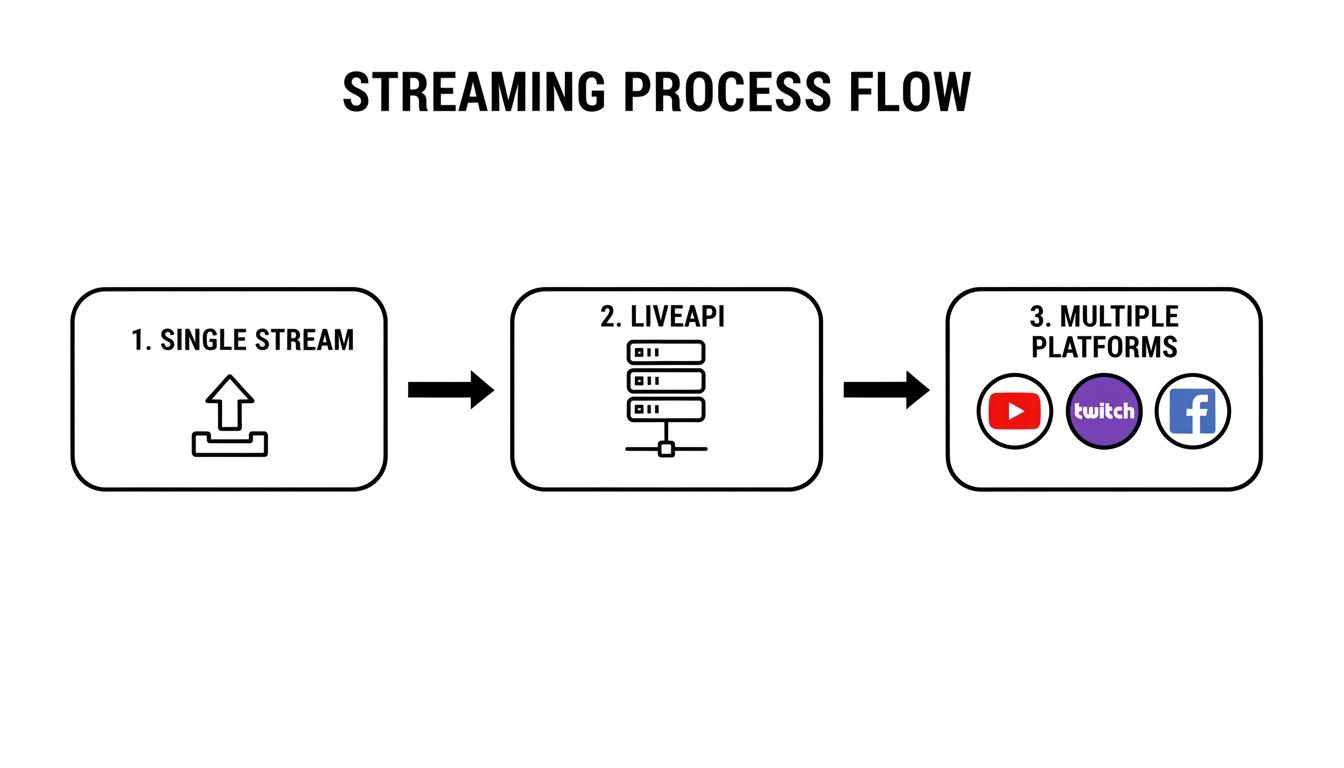
This model flips a complex, brittle setup into a streamlined and robust workflow that you control with a simple API.
The Core Components You’re Working With
Let’s break down the moving parts so you have a solid mental model before you write any code. Understanding how each piece works is key.
- Source Encoder (e.g., OBS, vMix): This is your production machine. Its only job is to capture your content, encode it into a high-quality RTMP or SRT stream, and push it to one place: the LiveAPI ingest server. It no longer needs to know about Twitch, YouTube, or any other final destination.
- LiveAPI Ingest Endpoint: Think of this as the single, stable front door for your stream. It’s a geographically-aware endpoint built for high availability. You send one stream here, and your local machine’s work is done.
- Transcoding and Distribution Engine: The moment your stream hits our servers, our backend kicks in. This is where we handle things like creating multiple quality levels for your viewers (Adaptive Bitrate transcoding) and repackaging the stream for all the different platforms.
- Multistreaming Targets: These are your final destinations, which you’ll set up through the API. You provide the RTMP URLs and stream keys for YouTube, Facebook, Kick, or a custom server, and LiveAPI manages each of those outbound connections independently.
The real magic here is decoupling. If your stream to Twitch goes down because of a bad stream key or an issue on their end, it has zero impact on your main broadcast or your streams to other platforms. The system automatically isolates the failure.
Why a Central Hub is a Strategic Move
This architectural shift is more than just a technical convenience; it gives you a real strategic edge. The online audience is more fragmented than ever, and being on multiple platforms is no longer a “nice-to-have”—it’s essential for growth.
Just look at the numbers. In Q3 2025, viewers consumed a mind-boggling 29.45 billion hours of livestreamed content. During that same period, YouTube Live’s market share actually dipped below 50% for the first time, while platforms like TikTok Live and Kick saw huge growth.
The data shows that creators who effectively multistream can expand their reach by 2-3x. Why? Because no single platform owns all the eyeballs anymore. If you want a deeper dive, the full report from Stream Charts on the global livestreaming landscape is well worth a read.
By using a centralized hub, you’re building a system that can pivot as the market does. When the next big platform emerges, adding it to your distribution is just a quick API call, not a full-blown reconfiguration of your studio. This agility lets you meet your audience wherever they are, both now and in the future.
Managing Stream Targets with Practical API Calls
Alright, let’s get our hands dirty. Moving from diagrams and theory to actual implementation is where you really see the magic of an API-first approach. This is the point where you stop just planning and start telling your multistreaming setup exactly what to do, programmatically. Forget fumbling through a dashboard; we’re going to build dynamic, responsive workflows right into your application.
I’ll walk you through the essential REST API calls for managing your stream targets. We’ll be using cURL for the examples because it’s a universal tool, but the logic and JSON payloads are exactly the same whether you’re working in Python, Node.js, or something else. We’re going to dissect each request and response so you feel confident plugging this into your own code.

First Things First: Creating the Main Stream
Before you can send your stream anywhere, you need to create a primary stream object in LiveAPI. Think of this as the main container for a specific broadcast. It’s what gives you the unique ingest credentials for your encoder and acts as the central hub that all your multistreaming destinations will connect to.
To get started, you’ll make a POST request to the /streams endpoint. The only thing you absolutely need to include in the JSON body is a name—just a simple, human-readable label for your own reference.
cURL Example curl -X POST ‘https://api.liveapi.com/v1/streams‘
-H ‘Authorization: Bearer YOUR_API_KEY’
-H ‘Content-Type: application/json’
-d ‘{ “name”: “My Weekly Product Demo” }’
In return, the API will give you a JSON object with the new stream’s id, its name, and most critically, the rtmp ingest details.
Sample JSON Response { “id”: “st_a1b2c3d4e5f6”, “name”: “My Weekly Product Demo”, “rtmp”: { “url”: “rtmp://ingest.liveapi.com/live”, “streamKey”: “st_a1b2c3d4e5f6-xyz789” }, “createdAt”: “2024-10-28T10:00:00Z” } Hang onto that id (st_a1b2c3d4e5f6), as you’ll need it for every other call related to this stream. The rtmp.url and rtmp.streamKey are what you’ll plug into OBS, vMix, or your hardware encoder. If you need a refresher on that part, you can learn more about setting up a live RTMP stream in our detailed walkthrough.
Adding a New Multistream Target
With your main stream ready, it’s time to add your first destination. Let’s say you want to stream to multiple platforms, and your first stop is your company’s YouTube channel. You’ll need to grab the RTMP URL and stream key from your YouTube Studio dashboard.
Now, you’ll make a POST request to the /streams/{streamId}/targets endpoint, slotting in the streamId you just got. The request body needs a name for the target, its destination url, and its streamKey.
cURL Example curl -X POST ‘https://api.liveapi.com/v1/streams/st_a1b2c3d4e5f6/targets‘
-H ‘Authorization: Bearer YOUR_API_KEY’
-H ‘Content-Type: application/json’
-d ‘{ “name”: “Primary YouTube Channel”, “url”: “rtmp://a.rtmp.youtube.com/live2”, “streamKey”: “abcd-efgh-ijkl-mnop-qrst” }’ Just like that, you’ve registered the YouTube channel as a destination for your “My Weekly Product Demo” stream. By default, any new target you add is enabled, meaning it will go live the moment your main stream starts.
Key Takeaway: The relationship is hierarchical. A single “stream” object is the parent, and it can have many “target” children. This structure is what lets you manage all destinations for a specific broadcast from one central point.
Real-World Scenario: Dynamic Activation
Here’s where it gets powerful. Imagine you’re an hour into a live product launch, and a partner suddenly wants to feature your stream on their Facebook page. Doing this manually mid-stream would be a scramble. With the API, it’s a non-event.
Your application simply needs to fire off another POST call, this time using the partner’s Facebook RTMP details.
cURL Example curl -X POST ‘https://api.liveapi.com/v1/streams/st_a1b2c3d4e5f6/targets‘
-H ‘Authorization: Bearer YOUR_API_KEY’
-H ‘Content-Type: application/json’
-d ‘{ “name”: “Partner Facebook Page Pop-up”, “url”: “rtmps://live-api-s.facebook.com:443/rtmp/”, “streamKey”: “FB-12345-67890-ABCDE” }’ In just a few seconds, LiveAPI spins up a new connection and starts pushing your video to their page. Crucially, this happens without any interruption to your existing stream on YouTube or anywhere else. This is a level of on-the-fly control that encoder-based multistreaming just can’t offer.
Listing and Toggling Stream Targets
Once you’ve set up a few targets, you’ll want to see and manage them. You can pull a list of every target attached to a stream with a simple GET request.
cURL Example curl -X GET ‘https://api.liveapi.com/v1/streams/st_a1b2c3d4e5f6/targets‘
-H ‘Authorization: Bearer YOUR_API_KEY’ The API will send back an array of target objects, each with its own id, name, and an enabled boolean flag. This little flag is your secret weapon for dynamic broadcast management.
Let’s say the partner’s promotional window is over, and you need to stop sending the stream to their Facebook page. You don’t want to delete the target, just pause it. You can do that with a PATCH request, using the targetId you’d get from the GET call above.
cURL Example curl -X PATCH ‘https://api.liveapi.com/v1/streams/st_a1b2c3d4e5f6/targets/tgt_f1g2h3i4j5k6‘
-H ‘Authorization: Bearer YOUR_API_KEY’
-H ‘Content-Type: application/json’
-d ‘{ “enabled”: false }’ The moment you send this, the connection to that specific RTMP server is cut, while all other active streams continue without a single dropped frame. To bring it back online, just send the same request with "enabled": true. This opens the door to some incredible automation possibilities based on schedules, user actions, or any other trigger in your app.
Ensuring a Flawless Viewer Experience
Getting your API calls configured to multistream is a huge win, but it’s really only half the battle. If your viewers are stuck watching a buffering wheel or a pixelated mess, all that slick backend work doesn’t mean much. The quality of the broadcast itself is what makes or breaks a professional stream, and that’s where the real magic of video engineering—transcoding and global delivery—comes in.
Luckily, LiveAPI handles this heavy lifting for you. When you push your single, high-quality stream to our ingest endpoint, our system instantly kicks into gear to create the best possible experience for every single viewer, no matter their device or location. You don’t need a team of video engineers; you just need to understand the two key processes making it all happen.

Adaptive Bitrate for Universal Compatibility
The first crucial piece is Adaptive Bitrate (ABR) streaming. You might be sending us a pristine 1080p, 60fps feed, but not everyone in your audience can handle that kind of data. Someone watching on a spotty mobile connection needs a much lighter version than a viewer with a fiber-optic line at home.
ABR solves this by transcoding your source stream into multiple versions, often called renditions or profiles. Each one has a different resolution and bitrate, creating what we call an ABR ladder. When a viewer hits play, their device automatically picks the best-quality rendition their network can support without buffering. If their connection gets better or worse, the player just switches to a different rendition on the fly.
This is the exact technology that powers buffer-free viewing on services like Netflix and YouTube, and LiveAPI bakes it into your stream by default.
LiveAPI Transcoding Profiles vs. Viewer Experience
This table illustrates how the Adaptive Bitrate Streaming (ABR) renditions created by LiveAPI map to different network conditions, ensuring a smooth experience for all viewers.
| Rendition (Resolution/Bitrate) | Target Network Condition | Typical Use Case |
|---|---|---|
| 1080p / 6 Mbps | Excellent (Fiber/LAN) | Watching on a large screen, like a Smart TV or desktop. |
| 720p / 3 Mbps | Good (Fast Wi-Fi/5G) | Viewing on a laptop or tablet with a stable connection. |
| 480p / 1.5 Mbps | Average (Decent LTE) | Mobile viewing while on the go or on a slower network. |
| 360p / 800 Kbps | Poor (Slow 4G/3G) | Ensuring the stream plays without interruption on weak signals. |
As you can see, this ladder approach means you’re covered no matter how your audience is watching.
Global CDN for Low-Latency Delivery
The second part of the equation is getting those video segments to your audience fast. If your stream originates from a server in Virginia, a viewer in Tokyo is going to experience a noticeable delay, or latency, as the data travels across the globe. This is where a Content Delivery Network (CDN) is absolutely essential.
LiveAPI partners with top-tier CDNs like Akamai and Cloudflare, which operate thousands of servers strategically placed around the world. As your stream goes live, our CDN caches the video segments on these local servers. A viewer in Tokyo pulls the video from a nearby server in Japan, not all the way from Virginia. This slashes latency and load times, making the whole experience feel snappy and responsive for everyone.
The combination of ABR transcoding and global CDN delivery is what separates a hobbyist stream from a professional broadcast. It ensures that every viewer, regardless of their device, location, or network speed, receives a stable, high-quality, and low-latency experience.
This kind of professional-grade infrastructure is more important than ever. While Twitch still commands a massive 60.3% market share with 5.1 billion hours watched, its dominance is shrinking as platforms like YouTube Gaming gain ground. To keep your audience, you have to deliver a premium viewing experience everywhere.
By handling the complex encoding and using powerful CDN integrations, LiveAPI makes sure your efforts to stream to multiple platforms result in a flawless broadcast. To dive deeper into viewership trends, check out these insightful live streaming statistics.
Keeping Your Streams Secure and Healthy
Alright, once you’ve got your multistreaming setup running, the game changes. Your focus immediately pivots to two critical tasks: locking down your broadcast and keeping a close eye on its performance. Nothing tanks an event faster than an unauthorized user hijacking your feed or a silent failure on a platform like YouTube.
Let’s walk through how to use the API to build a fortress around your content and create a real-time monitoring system that tells you exactly what’s happening, the moment it happens.
Practical Security for Your Broadcasts
Protecting your stream isn’t just about fending off bad actors; it’s about controlling your content. LiveAPI gives you a few different tools for this, so you can pick the right approach for your app.
Think of your stream key as the most basic lock on your door. It’s the password for your broadcast, and you need to treat it like one. That means never, ever exposing it in client-side code or committing it to a public GitHub repo. Seriously.
For anything more serious than a hobby stream, you’ll want to add more layers. That’s where authentication tokens come in, adding a dynamic security element that a static stream key just can’t match.
- JWT Authentication: JSON Web Tokens (JWT) are perfect for generating short-lived, signed tokens. They grant temporary stream access, which is incredibly useful if you have multiple users or devices that need to go live. You can issue a unique token for each session without ever revealing the master key.
- Domain Whitelisting: If you’re embedding the player on your own website, you can lock it down to specific domains. This simple step prevents other people from grabbing your embed code and dropping your player on their site, keeping your content exactly where you want it.
- Bearer Tokens: For any server-side API calls, a bearer token is non-negotiable. It proves your application has the authority to create, manage, or delete streams and targets. We’ve got a detailed technical breakdown on this, so check out our guide on bearer token authentication to see how it works under the hood.
A single stream key is like a single lock on a bank vault—it’s just not enough. Real security comes from layering your defenses. Combining a protected key with JWTs and domain whitelisting creates a much tougher barrier against unwanted access.
Real-Time Monitoring with Webhooks and Analytics
Security is about prevention, but monitoring is all about awareness. You can’t fix a problem you don’t know exists. When you’re streaming to multiple platforms, a connection can drop for a dozen reasons—a typo in a stream key, a platform outage, or a network hiccup. You need to know the second it goes down.
This is where webhooks are an absolute lifesaver.
Instead of hammering the API every few seconds asking “Are we still live?”, you can just have LiveAPI tell you. Webhooks push instant notifications to your server the moment a key event occurs, giving you real-time data without the overhead.
Setting Up Your Essential Webhooks
You can configure webhooks for all sorts of events, but for any multistreaming workflow, these are the ones you absolutely need:
stream.started: This is your first green light. It confirms your encoder is successfully connected and the primary ingest is healthy.stream.ended: This tells you the main broadcast has stopped, which should automatically trigger the shutdown of all your outbound streams.target.connected: Get a confirmation ping the moment you’re successfully live on a specific platform like Twitch or Facebook.target.disconnected: This is your red alert. It fires instantly when a connection to a destination drops. You can use this to trigger a Slack notification for your ops team or even kick off an automated reconnection attempt.
This event-driven model means your application can react immediately to changes in stream health, all without wasting resources on constant polling.
Finally, while webhooks handle the real-time operational alerts, the API also gives you access to a ton of analytics for tracking performance. You can pull viewership numbers, engagement stats, and quality-of-service metrics from all your destinations. This lets you build a unified dashboard to see which platforms are driving the most viewers and where your audience is most engaged—giving you a complete picture of your broadcast’s success from a single source.
Common Questions About Multistreaming with an API
Once you start digging into an API-driven workflow, the “what-if” questions pop up fast. When you decide to stream to multiple platforms using an API, you need to know it can handle the messy, real-world scenarios. Let’s walk through some of the most common questions developers ask when they’re implementing a solution like LiveAPI.
Think of this as the practical, no-nonsense Q&A on how the architecture we’ve discussed actually performs under pressure.
How Does LiveAPI Handle Different Platform Requirements?
This is probably the biggest headache that an API-first approach solves. You send us a single, high-quality RTMP stream, and we handle the rest.
While platforms like YouTube, Twitch, and LinkedIn all take RTMP, their specific recommendations for bitrate, keyframe intervals, or even audio codecs can differ slightly. Trying to configure your encoder to juggle all of that is a recipe for frustration and errors.
With LiveAPI, our backend automatically optimizes for these different requirements. We transcode and repackage your stream on our end to make sure it’s stable and compliant for every single destination. All you have to worry about is pushing one perfect upstream feed; we manage the complex fan-out for you.
The core idea here is abstraction. Your application and encoder only need to know about one destination: LiveAPI. This radically simplifies your setup and makes your entire workflow more resilient and much easier to maintain.
Can I Programmatically Control Targets Mid-Broadcast?
Yes, absolutely. This is one of the most powerful features for managing dynamic events and a massive advantage over static, encoder-based multistreaming.
Using the API endpoints we covered earlier, you can fire off a PATCH request to enable or disable any multistream target at any time—even while the broadcast is live.
Imagine you need to end the stream on a partner’s Facebook page but keep your main YouTube channel running. A simple API call to set that specific target’s enabled status to false will gracefully terminate that connection. Every other active stream continues completely uninterrupted. You can just as easily add and enable a brand-new target right in the middle of your event.
What Happens if a Destination Fails?
LiveAPI is built for fault tolerance. If a connection to a target platform drops, that failure is completely isolated from the rest of your broadcast. This can happen for a few reasons:
- Invalid Stream Key: A simple typo will block the connection.
- Platform Outage: The destination’s ingest servers might be having a bad day.
- Network Issues: A routing problem between our servers and the destination.
In any of these situations, the failed connection won’t touch your primary ingest stream or any other active multistream destinations. The stream to the problematic target simply stops, while your broadcast continues seamlessly everywhere else.
This is where webhooks become your best friend. We give you real-time feedback through target.disconnected events so your application knows what’s happening immediately. This lets you log the error, send an alert to an admin, or even build logic to programmatically try reconnecting with corrected credentials.
How Does Adaptive Bitrate Work with Multistreaming?
This is a really important distinction. When you send your source stream to LiveAPI, our transcoding engine immediately creates an Adaptive Bitrate (ABR) ladder with multiple lower-resolution versions.
This ABR ladder is mainly for viewers watching your stream through a player embedded via LiveAPI—say, on your own website. It’s what gives them that smooth, buffer-free experience, no matter their connection speed.
But when you stream to multiple platforms like Twitch or YouTube, those services have their own transcoding systems. We send a stable, high-quality stream to them, and they create their own ABR ladders for their viewers. The benefit of LiveAPI’s transcoding in this scenario is twofold:
- It guarantees the stream we push to each platform is perfectly optimized for their ingest servers.
- It provides that fallback ABR stream for your own embedded players, giving you complete control over the viewer experience on your own properties.
This hybrid approach ensures the best possible quality and stability for your audience, whether they’re watching on a third-party platform or right on your own site.
Ready to build a resilient, API-driven multistreaming workflow? With LiveAPI, you can stop wrestling with complex infrastructure and start focusing on creating incredible live experiences. Explore our developer-first tools and see how easy it is to stream everywhere, all at once.